
Hey productivity fam! 💻 If you're anything like me, you practically live in Google Drive—storing files, collaborating on docs, and desperately searching for that one PDF someone sent three weeks ago. And let's be real, Google Drive by itself is already a powerhouse. But this is 2026, and we can do so much better than just "good enough." I've been on a mission to cut out every unnecessary click, every annoying download, and every moment of friction from my workflow. The result? A carefully curated arsenal of browser extensions that turn Drive from a simple cloud locker into a turbocharged command center. 🚀 Whether you're a student, a creative, or a spreadsheet warrior, these seven tools will save you hours of mindless clicking and keep your digital life silky smooth. Ready? Let's dive in!
1. Save to Google Drive: Capture Anything in a Flash 📸
We all stumble across brilliant articles, hilarious memes, or crucial PDFs while browsing. Before this extension, I’d download them to my desktop, forget about them, and then cringe when I needed them later. The Save to Google Drive extension is the cure. Once you install it, you can right-click on any image or PDF and hit Save [File] to Google Drive without ever leaving the page. Better yet, you can save an entire webpage with a single click on the toolbar icon—no more bookmark clutter!
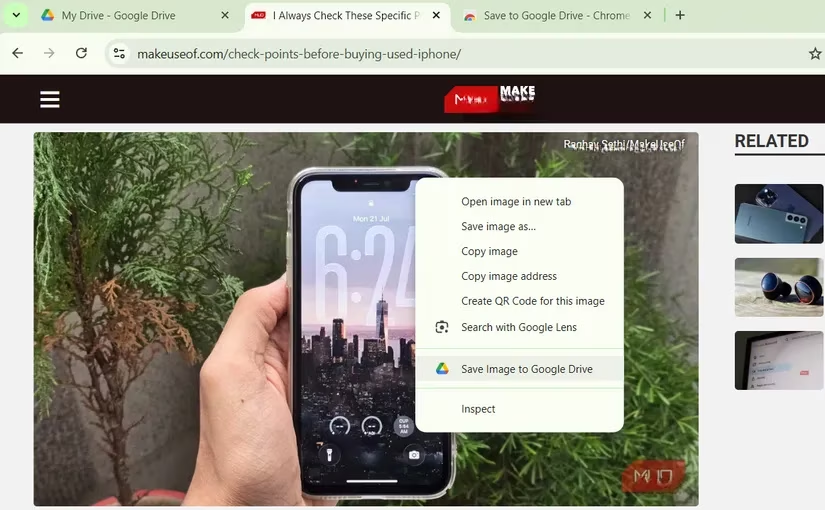
The real magic lies in the settings: you can choose to save web pages as a PNG, an HTML file, or even a fully editable Google Doc. And by setting a default folder, all your spontaneous web finds land safely in one spot, instantly accessible from your phone, tablet, or any other device. It’s like having a digital scrapbook that organizes itself. 📁✨
2. Open with Google Drive Viewer: Peek Before You Download 👀
You know that moment when a colleague sends you a Word doc or a ZIP file and you just want to glance at it, not commit to downloading and opening it? This extension is your new best friend. With the Open with Google Drive Viewer, you can right-click any supported file—DOC, XLS, PDF, PPT, ZIP, HTML, and even JS files—and instantly view it in a clean Drive preview tab. Zero downloading, zero app-switching.
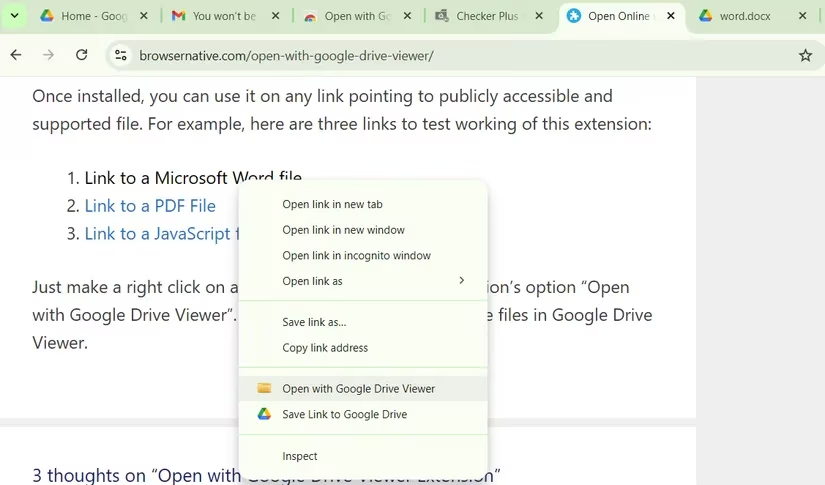
I use this daily to quickly check invoices, contracts, or that random ZIP of images someone sent. And if the file is actually worth keeping, there’s a handy button to save it directly to your Drive from the viewer. It's like a drive-thru window for your files. 🚗💨
3. Office Editing for Docs, Sheets & Slides: Edit Without Converting 📝
Collaborating with people who still use Microsoft Office can be painful. Traditionally, you'd have to upload their file to Drive, convert it to Google's format, make your edits, and then maybe convert it back. This Google-made extension wipes out that hassle completely. Now, you can literally drag a Word, Excel, or PowerPoint file straight into your Chrome browser, and it opens in a native-like editor. You can view and make edits without converting a thing.
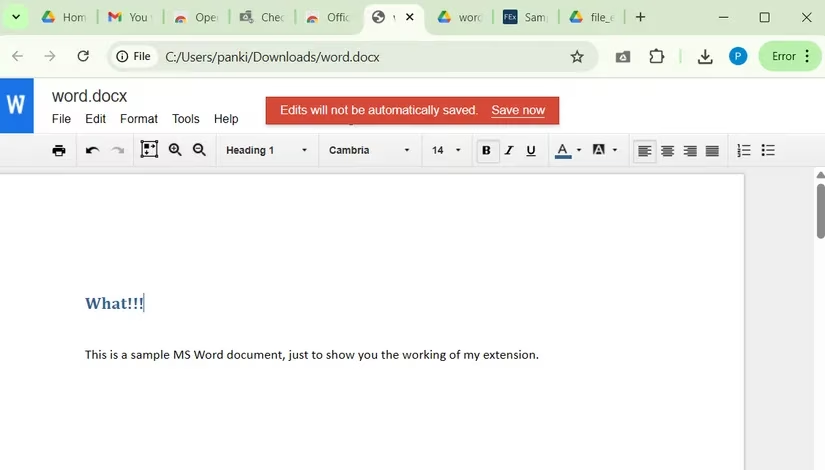
When you're done, just save your changes in the original Office format—your team won't even know you didn't use Microsoft 365. Of course, if you prefer the Google ecosystem, you can optionally convert it to Docs, Sheets, or Slides and save it to your Drive. This extension has saved me from endless formatting nightmares and that awkward "can you resend that in Google Docs?" email. 🙏
4. Save Emails to Google Drive: Tame the Inbox Beast 📧
Inbox chaos is real—receipts, flight itineraries, client contracts, and those long email threads that contain one vital piece of info. The Save Emails to Google Drive extension (powered by cloudHQ) lets you create hard-copy backups of entire emails and their attachments with one click. You can store them in a private folder or a shared Drive location so your entire team gets instant access, no forwarding required.
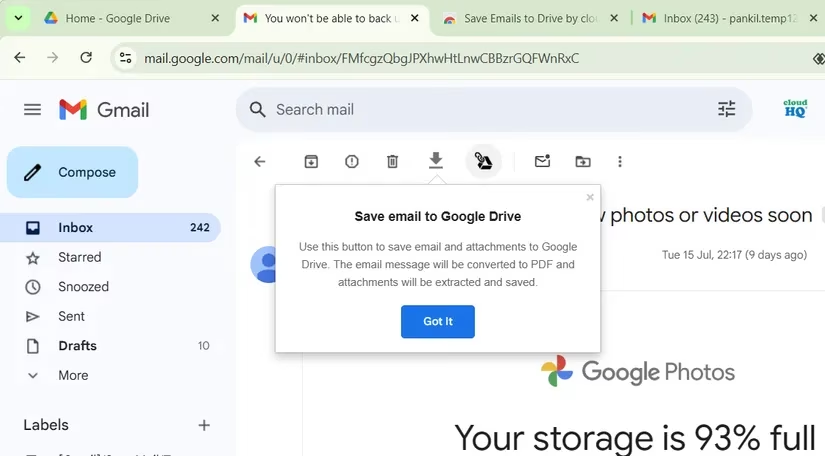
After a quick one-time setup, you can save emails as PDF, TXT, HTML, or even the original EML format. I use it to automatically route all meeting confirmations and tax-related receipts to a dedicated folder. Now, when tax season hits, I’m not frantically digging through Gmail search—everything is already neat and tidy in Drive. 📂💼
5. Checker Plus for Google Drive: Your Drive at a Glance 🔍
This one is an absolute must-pin. Checker Plus puts a tiny icon in your Chrome toolbar that, when clicked, opens a pop-up showing your entire Google Drive. You can search, rename, delete, or open files without ever visiting drive.google.com. It’s perfect for those micro-interactions throughout the day—like checking if a client already uploaded that contract or quickly finding a presentation before a meeting.
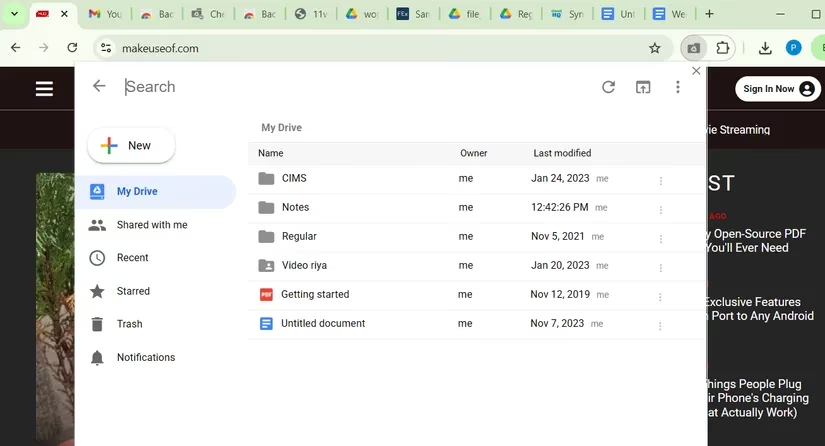
But the real killer feature? Real-time notifications when someone opens, edits, moves, or deletes a file you care about. You can customize which folders to monitor, so you only see alerts that matter. I once caught a team member accidentally deleting a crucial spreadsheet because Checker Plus pinged me instantly. Crisis averted! ⚡️🛡
6. Backup and Sync for Google Drive: Multi-Cloud Freedom ☁️
Google Drive is my primary hub, but sometimes a project requires sending files to Dropbox, OneDrive, or Box. Instead of the tedious download-then-upload dance, the Backup and Sync extension adds a Save to button right inside Google Docs, Sheets, and Slides. Click it, pick your secondary cloud service, sign in once, and the file syncs there automatically. Any future edits you make in Google’s editor will sync in real time!
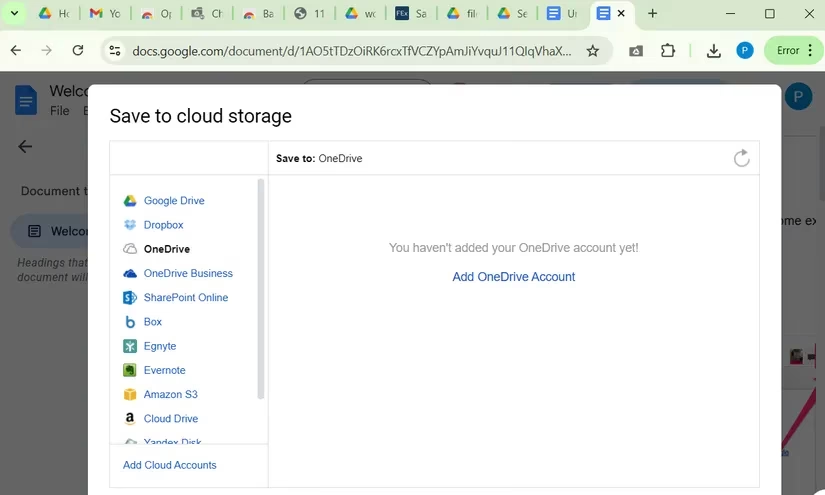
You can also set up folder-level sync from within Google Drive itself. Just open a Drive folder, click Sync this folder, and follow the wizard to mirror it to another cloud service. This is a godsend for agencies or freelancers who juggle clients across different platforms. One file, multiple clouds, zero extra work. 🌍✨
7. Notes for Google Drive: Capture Stray Thoughts Instantly 🧠
Ever had a brilliant idea while reading an email or watching a tutorial, but by the time you open a new Google Doc, it’s gone? The Notes extension is the solution to our scattered-brain syndrome. Click its tiny icon in your toolbar, start typing, and your note is automatically saved as a Google Doc in a special Notes folder on your Drive. The first line becomes the title, so searching later is effortless.
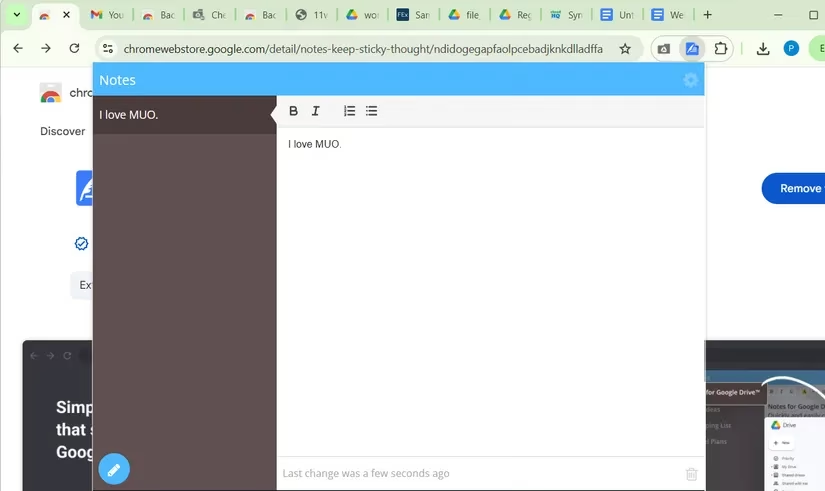
Even cooler, you can scroll through and edit all your past notes right inside that same pop-up window—no need to open a separate Google Drive tab. I use it as my friction-free brain dump for everything from grocery lists to article outlines. It’s the digital equivalent of a sticky note that never gets lost. 🗒️💡
Final Thoughts: Level Up Your Drive Life
In 2026, Google Drive remains an indispensable part of our digital toolkit, but these extensions are what truly unlock its superpowers. They don’t just add features—they strip away the tedious little tasks that eat up our attention. Whether you're a solo creator or part of a bustling team, weaving a few of these into your browser will make your daily grind feel lighter and faster.
Give them a try, mix and match according to your workflow, and watch your Google Drive experience go from "great" to "legendary." Have a favorite extension I missed? Drop it in the comments! As always, stay productive and keep crushing it. 💪😎