
Ah, the default new tab page. It's like a blank, polite stranger—functional, sure, but utterly devoid of soul. It greets me with a sterile grid of most-visited sites and a search bar, but it never tells me if I need an umbrella today or whispers the latest headlines. For years, I just put up with it, thinking that's how it's meant to be. But in 2026, when browsers seem more focused on stripping features than empowering users, I decided it was time for a rebellion. A quiet, personal one. I would build a home page that felt like an extension of my own mind—a dashboard that breathes.
I've always treated my browser's new tab as my digital front door. Every time I fire it up, it should offer a warm, informative welcome, not just a cold, empty hallway. Sure, there are extensions like Momentum that try to do this, but using them always felt a bit like living in a beautifully furnished rental apartment. The layout is someone else's vision; you can rearrange the cushions, but you can't knock down a wall. I craved a place built from my own blueprints.
So, I rolled up my sleeves. The beauty of this project is its simplicity at heart. You don't need a fancy IDE or a server farm; just a text editor and a folder with four humble files. Think of them as the organs of our little digital creature:
-
index.html: The skeleton. The basic structure holding everything together. -
style.css: The skin and wardrobe. It defines the look, the colors, the very feel of the space. -
main.js: The nervous system. It adds life, motion, and interactivity. -
manifest.json: The birth certificate. This tiny file whispers to Chrome, "Hey, let me be the new face of every fresh tab."
With a single, magical line in the manifest.json, the pact is sealed:
"chrome_url_overrides": {

 "newtab": "index.html"

}
Now, for the soul. I started with the sky. I wanted the weather not as a bland icon, but as a living breath of the outside world right at the top. Using the OpenWeather API, I taught my page to gently inquire about the heavens over my city. A few lines of JavaScript, and suddenly, the page knew if it was a day for sunshine or for cozying up indoors. It felt like giving my homepage a sense of place.
fetch(`https://api.openweathermap.org/data/2.5/weather?q=New Delhi&appid=${API_KEY}&units=metric`)

 .then(res => res.json())

 .then(data => {

   // The page now whispers the temperature and the city's name

 });
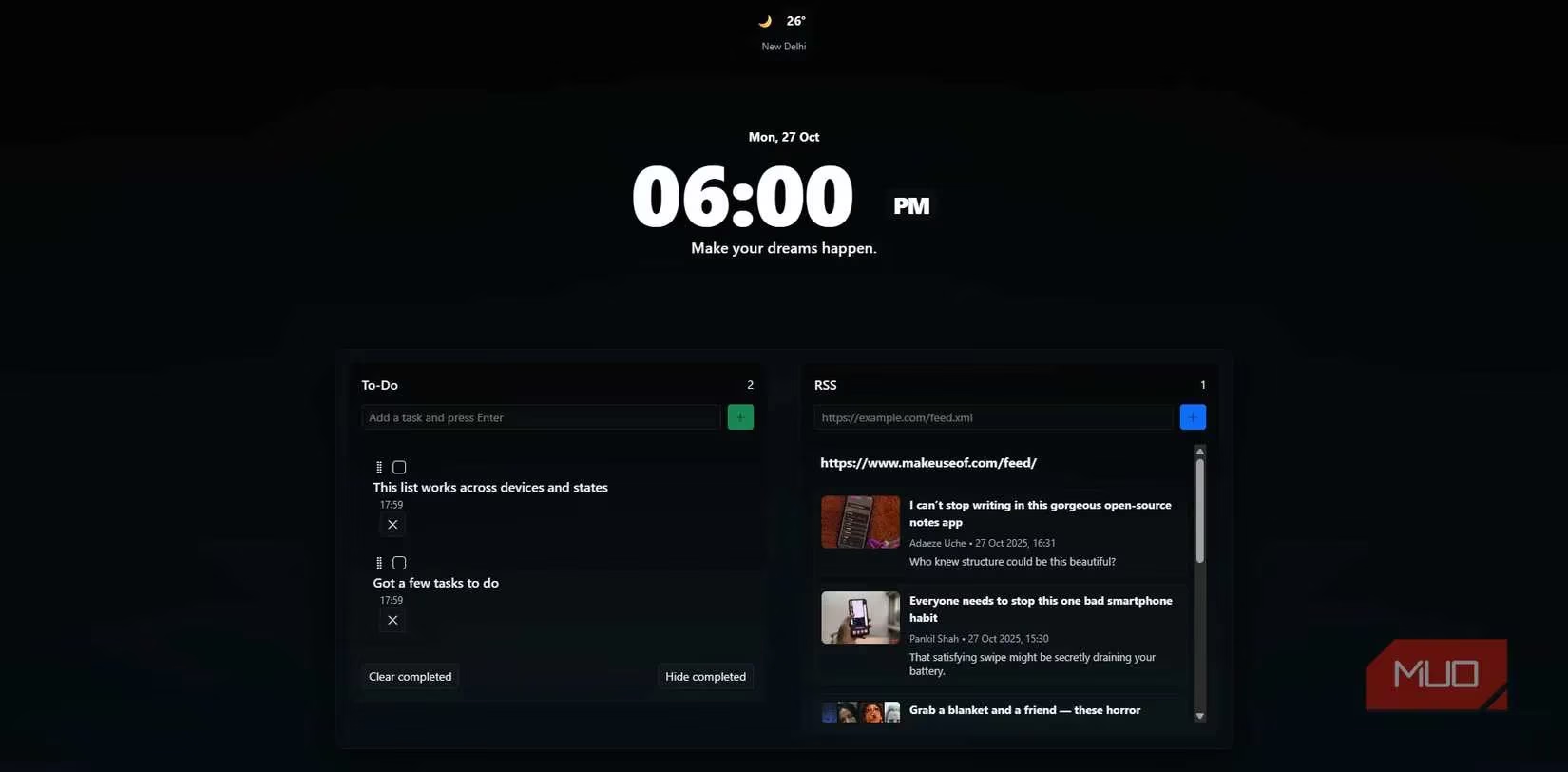
In the center, I placed a heart: a large, sweeping digital clock. I often leave my browser idling on a new tab, you see, and a static page can feel… dead. This clock, ticking away with setInterval(), gave the whole canvas a pulse. It’s a constant, quiet reminder that time is flowing, even when I'm just thinking. It's the little things, honestly.
For nourishment, I added an RSS feed—a stream of thoughts from the wider web. Defaulting to my favorite tech reads, it parses the feed, presenting each article as a tempting morsel: a headline, a thumbnail, a byline. It was a tad tricky with those pesky CORS restrictions, but a trusty coding AI companion helped me weave a fallback proxy into the logic, ensuring the stream never runs dry. It's like having a thoughtful friend who clips interesting articles and leaves them on your desk.
And finally, the grounding element: a to-do list. But not just any list. This one saves its state to Chrome's sync storage. This means my tasks, my little promises to myself, follow me from my desktop to my laptop, faithfully. The logic is elegant in its simplicity—add, display, store, repeat. It’s the digital equivalent of a reliable notebook that never gets lost.
// A snippet that saves tasks across my Chrome-synced universe

const saveTask = async (task) => {

  // Logic that checks for Chrome sync or falls back to local storage

};
But a functional machine is not a home. It needed beauty. I chose a dark, subtle palette, easy on the eyes during late-night coding sessions. I painted the background with a soft vertical gradient—from deep space black to a hint of midnight blue—and added a barely-there vignette effect around the edges for depth. Using Bootstrap, I made sure it all breathed gracefully on any screen size. The goal was sleek, distraction-free, and kind of… cozy. I didn't want some RAM-gobbling monster; I wanted a serene digital alcove that felt native to Chrome's own aesthetic.
| Design Element | Purpose | Feeling It Evokes |
|---|---|---|
| Dark Gradient Background | Reduce eye strain, create focus | A calm, night sky canvas |
Rounded Glass-like Cards (border-radius: 1rem) |
Soften the interface, modern look | Smooth pebbles in a stream |
| Subtle Vignette | Draw the eye inward, add depth | The gentle fade of a spotlight |
When the code was singing, it was time to bring it to life in Chrome. The process is wonderfully straightforward:
-
Visit
chrome://extensions. -
Flip on Developer mode (like a secret switch).
-
Click Load unpacked.
-
Select the folder containing my four faithful files.
And just like that, my creation was alive. Any future tweak—a color change, a new RSS feed—is just a quick page refresh away. This little extension, born from my own code, plays nicely with other Chromium-based browsers too—Edge, Brave, you name it. No fuss.
Now, every new tab is a moment of clarity. A glance at the weather, the steady beat of the clock, a scroll through fresh ideas, a check on my goals. It’s all there, laid out in my design, with no ads, no clutter, no one else's agenda. Building this wasn't just a coding exercise; it was an act of reclaiming a tiny corner of my digital world. If you spend hours in your browser, why not spend a few more to make it truly, deeply yours? A little HTML, a dash of CSS, a sprinkle of JavaScript—it's enough to build a home.