
In 2026, Google Maps is still the map I open first, but the browser extensions around it have become the quiet productivity layer that keeps my trips organized. I use Google Maps for directions, yet I depend on five Chrome add-ons for search, route optimization, coordinate sharing, fuel budgeting, and even restoring a button that regulators pushed out of European search results. They do not replace the core app. They patch the gaps that show up when I am planning a weekend drive, comparing stops for work, or reading a travel blog with a landmark buried in paragraph nine.
Here is how I rank them for 2026:
| Extension | Best for | Price | My verdict |
|---|---|---|---|
| Maps Express | Fast searches and saved places | $2 lifetime after a 7-day trial | ⚡ Best everyday helper |
| Routora | Multi-stop route optimization | Free for 10 stops; paid plans from $14.49 monthly | 🚗 Best for road trips |
| Share to Google Maps | Right-click coordinates and addresses | Free | 📍 Best quick-share tool |
| Fuel Cost for Google Maps | Budgeting fuel before a drive | Free | ⛽ Best money saver |
| Google Search Maps Button | Restoring the Maps button in search | Free | 🗺️ Best small fix |
Maps Express: Search without leaving the page
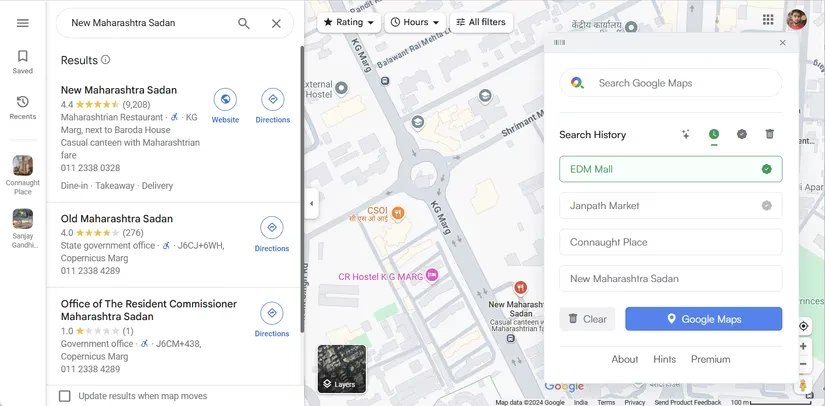
I often read travel articles, watch videos, and scan work documents that mention a place I want to check later. Maps Express removes the copy-paste shuffle. On Windows I press Alt + Shift + S, on Mac I press ⌥ + ⇧ + S, or I click the toolbar icon. The extension searches for locations right from the page I am on, which sounds minor until I have done it a dozen times in one afternoon.
The feature I use most is Search History. It saves my last ten searches, so I do not retype the same hotel, trailhead, or client office. I can also add important places to a Favorites List by clicking the plus icon in the search history. The extension supports import and export for favorites, which helps when I move between machines. Page Summary is useful when a long webpage feels noisy; it pulls out the key location details and cuts through the clutter. Search results stay for a day, and a Clear button wipes them whenever I want. There is also a Delete Mode for removing specific spots or the entire history.
Maps Express costs $2.00 for lifetime access, and the 7-day free trial makes it easy to test. In 2026, that is less than the price of a coffee for a tool I open almost every week.
Routora: The multi-stop fix Google Maps still needs
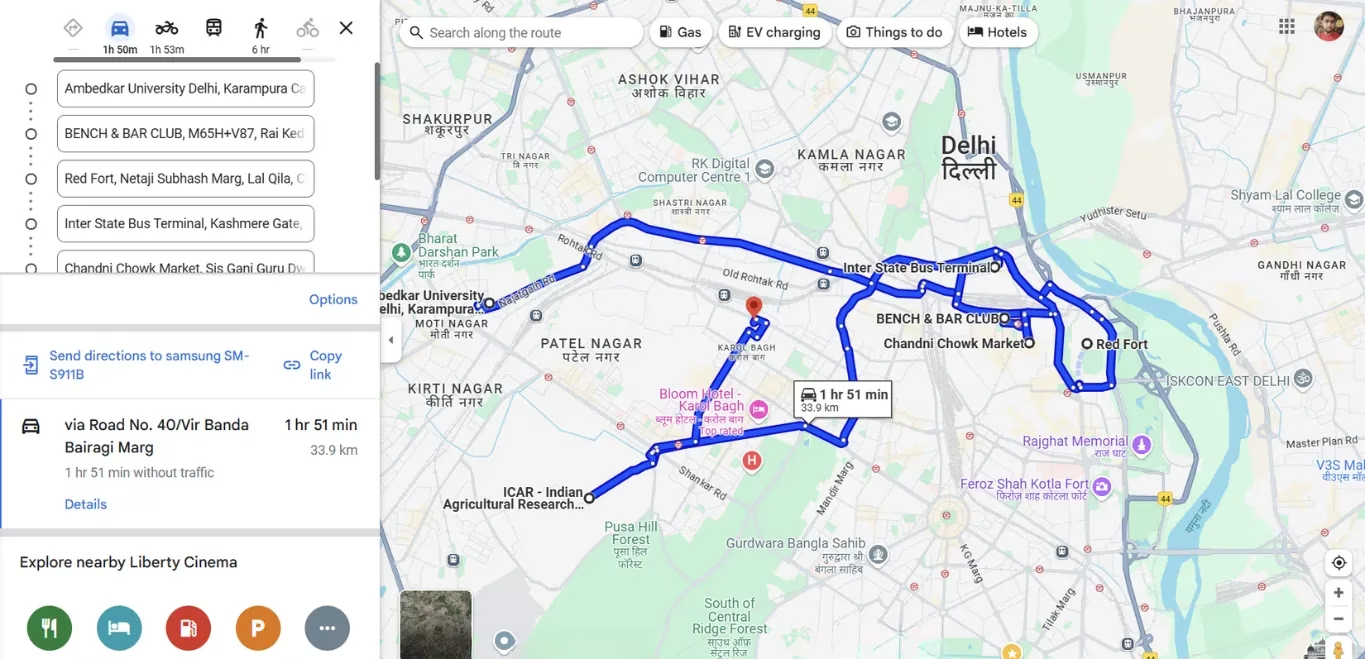
Planning a trip with several stops can be frustrating because Google Maps lists stops in the order I enter them, not always in the fastest order. Routora calculates the shortest and fastest path for me. I still use Google Maps for turn-by-turn directions, but for multi-stop trips I prefer Routora because it saves time and makes navigation less stressful.
My workflow is simple. I add all my stops in Google Maps as usual, then click the Routora icon in the Chrome extensions panel. It opens another tab with the same destinations, but now they are optimized. In one example from the reference material, a route that took about 1 hour and 51 minutes dropped to 1 hour and 27 minutes. The distance fell from 33.9 km to 27.3 km. That is nearly 34 minutes and 6.6 km saved on a single trip.
The free version optimizes up to ten stops for driving, biking, or walking. The paid version supports up to 100 stops, imports from Excel or CSV files, downloads itineraries, and shares routes with others. It costs $14.49 monthly or $173.99 billed annually. For frequent travelers or delivery drivers with many stops in a day, the math can work quickly.
Share to Google Maps: A right-click shortcut for coordinates
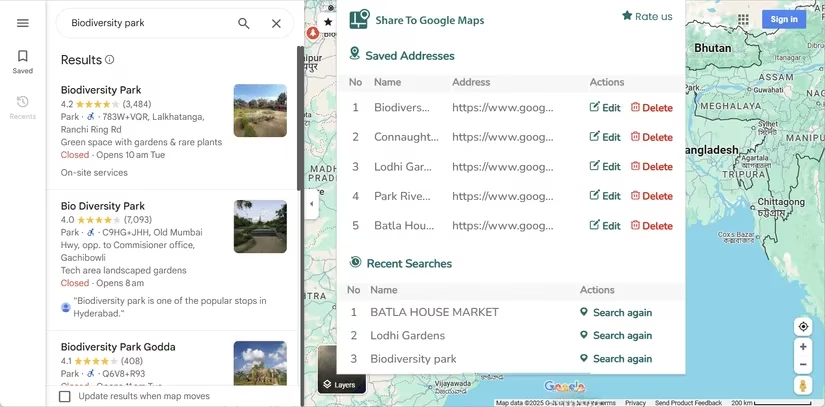
While browsing, I sometimes find a landmark, an address, or a set of coordinates that I need on Google Maps. Normally that means copying the text, opening a new tab, and pasting it into Maps. Share to Google Maps skips that routine. After I install the extension, a small icon appears in the browser toolbar. When I see a location or coordinate, I right-click it and choose Share to Google Maps > Show on Google Maps. The extension opens Google Maps in another tab and displays the location.
It also records my last three searches for quick access and lets me save up to five frequently visited locations as shortcuts. I can edit or delete those shortcuts at any time. To use one, I highlight the text, right-click, choose Share to Google Maps, and pick the saved shortcut. The extension is free, and it is one of those tools that becomes invisible because it removes friction so cleanly.
Fuel Cost for Google Maps: Know the price before you drive
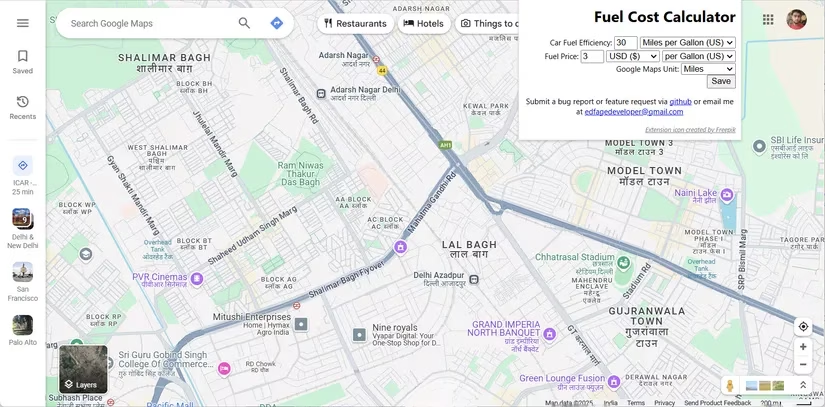
Fuel costs matter for daily commutes and road trips, and they matter for the environment too. Fuel Cost for Google Maps calculates how much I will spend on fuel before I hit the road. I install the extension, click the toolbar icon, and enter my car's fuel efficiency, the Google Maps unit in miles or kilometers, and the fuel price at my starting point. After I click Save, the setup is done.
When I plan a trip, I put my starting and ending locations in Google Maps. The extension calculates the distance and gives me an estimated fuel cost. If I add multiple stops, the expense updates automatically. That small preview helps me decide whether a longer scenic route is worth the extra spend or whether I should split a journey into two days. The extension is free, and in 2026 it remains one of the simplest ways to turn distance into a budget number.
Google Search Maps Button: A small fix for European users
In March 2024, Google removed the Maps button from search pages for European users because of the Digital Markets Act. The law is meant to promote fair competition and innovation in digital markets, but the change had a practical effect on people who frequently jump from search results to maps. If the Maps button is gone or missing from a search page, the Google Search Maps Button extension restores it to its original spot in the Google search bar. I install it, and Google Maps is one click away again, with no extra steps or tabs.
The bottom line
These five extensions do not reinvent Google Maps. They make it more usable in the moments when the core app is slow, rigid, or missing a shortcut. 🗺️ Maps Express speeds up search, Routora fixes multi-stop order, Share to Google Maps handles coordinates, Fuel Cost for Google Maps turns distance into dollars, and Google Search Maps Button restores a small but useful control. In 2026, my advice is to start with the free tools, test them on a real trip, and keep the paid ones only if they save time every week. For me, that combination has made Google Maps less of a destination and more of a daily driver.