
In 2026, AI-powered image generators have become so sophisticated that even seasoned internet users can be fooled by a synthetic photo. What looks like a candid vacation snapshot or a professional product shot may actually be the output of a machine learning model. For anyone who wants to separate fact from fiction without turning into a forensic analyst, a specialized extension such as Hive AI Detector can be a real game-changer. This free Chrome extension leans on advanced machine learning models to estimate whether an image is AI-generated, and it does so in a way that is fast, simple, and surprisingly accurate.

Why Manual Detection Can Be a Wild Goose Chase
There is no shortage of manual tricks for spotting AI-generated images. A cautious viewer might inspect the image description, tags, or watermarks. They might zoom in on hands, teeth, jewelry, or background text, looking for the classic tells of generative models: unnatural textures, distorted details, melted edges, or inconsistencies in lighting and perspective. These methods can work, but they are slow, subjective, and easy to get wrong. After all, modern AI tools are constantly learning from their mistakes.
| Manual Method | What Users Look For | Drawback |
|---|---|---|
| Metadata check | Description, tags, camera data | Often stripped or faked |
| Watermark hunt | Visible or invisible markers | Not all generators add them |
| Detail inspection | Hands, text, reflections, textures | Time-consuming and inconsistent |
| Reverse search | Matching image online | AI images can be unique |
| Gut feeling | Something looks off | Not reliable |
That is where a dedicated detector cuts through the noise. Instead of relying on a hunch, users can get a probability score in seconds.
How Hive AI Detector Works
Hive AI Detector is a free Chrome extension that adds an extra layer of verification to everyday browsing. Once installed, it sits quietly in the browser until needed. The process is about as easy as pie:
-
Download the Hive AI Detector extension from the Chrome Web Store.
-
Right-click on any image that needs checking.
-
Select the Hive AI Detector option from the context menu.
-
Read the probability percentage in the popup that appears on the right side of the screen.
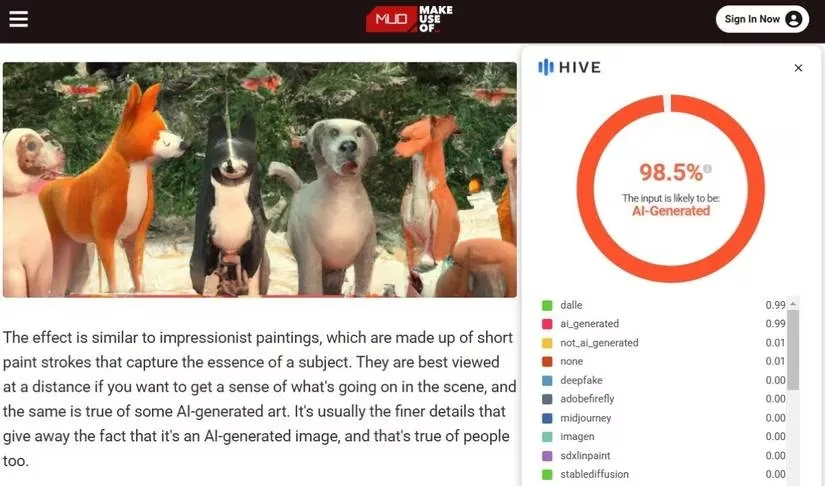
The result is not a vague yes-or-no answer. It is a percentage that indicates how likely the image is to be AI-generated. That nuance matters, because some images are edited rather than fully synthesized, and a probability score gives users more context than a simple label.
More Than One Way to Skin a Cat
Hive AI Detector does not force users into a single workflow. It offers several convenient ways to analyze an image:
-
Right-click analysis: The fastest route for images already visible on a webpage.
-
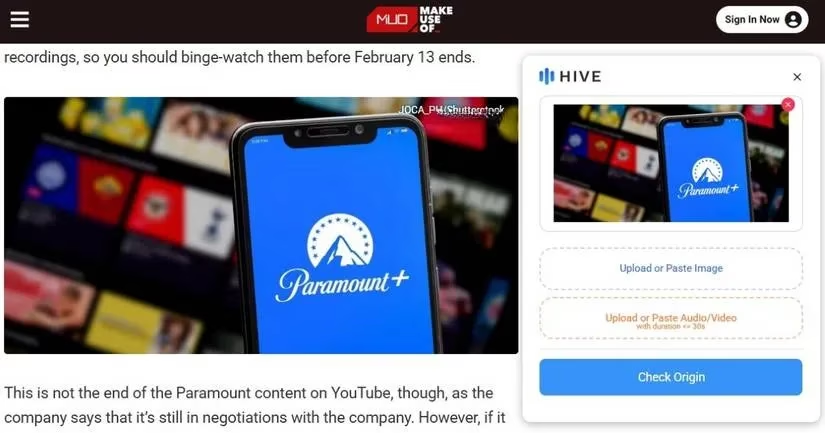
Drag-and-drop: Click the Hive AI Detector icon in the lower-right corner of the browser, then drag an image into the popup.
-
Direct upload: Choose an image from the computer when it is not available on a webpage.
This flexibility makes the extension useful for social media browsing, online shopping, news reading, and research. A user might be checking a profile picture, a product listing, a news photo, or a meme that seems too strange to be real. In each case, the extension turns a tricky judgment call into a quick, repeatable check.
Accuracy and Speed That Hit the Mark
According to hands-on testing described in the reference material, Hive AI Detector is impressively accurate at identifying AI-generated images. It was tested with a mix of real and AI-created visuals, and it reportedly got them right every time. It is also incredibly fast, delivering results in seconds. That combination of accuracy and speed is what makes it a must-have tool for effortlessly verifying anything uncertain.
Of course, no detector is perfect. AI image generators evolve, and detection models must keep pace. Yet for everyday use, Hive AI Detector offers a practical advantage: it removes much of the guesswork. Instead of squinting at a suspicious image and wondering whether the fingers look wrong, users can get a data-backed estimate and move on with their day.
Why This Matters in 2026
AI-generated images are no longer a niche curiosity. They appear in advertising, social media, journalism, dating profiles, e-commerce, and entertainment. Some are harmless creative experiments; others are designed to mislead. In a world where seeing is no longer believing, tools that help people verify visual content are worth their weight in gold.
Hive AI Detector is not just for tech experts. It is for anyone who wants a quick way to distinguish between human-made and AI-generated material. The extension is free, lightweight, and simple enough for casual users, yet powered by sophisticated models behind the scenes. For teachers, journalists, shoppers, researchers, and everyday browsers, it can serve as a handy second pair of eyes.
The Bottom Line
Hive AI Detector takes the guesswork out of identifying AI-generated content, which is incredibly convenient. If a quick, reliable way to separate real images from synthetic ones is the goal, this Chrome extension is definitely worth a try. It may not replace critical thinking, but it gives users a powerful head start. In 2026, that is no small thing. After all, when AI can paint a masterpiece in seconds, a tool that spots the brushstrokes is a welcome ally. 😊