
Last year I treated Honey like a pocket-sized coupon bloodhound. In 2026, after the viral allegations that PayPal-owned Honey was hiding better codes and pushing its own partner deals, I started paying closer attention. I can’t personally audit every claim, but trust is a coupon you can’t stack. Honey began to feel like a stage magician’s hat: it kept producing scarves, but never the rabbit I actually wanted. So I rebuilt my shopping stack around tools that do narrower jobs better. Here’s what I actually use now.

Why I stopped relying on one magic button 🍯
Honey’s pitch is simple: install it, shop normally, and let it find coupons. That sounds great until you realize a coupon extension without price history is like a weather vane with no wind: it spins, but it doesn’t tell you much. I want to know whether a deal is genuinely good, whether cashback is available, and whether other shoppers have already stress-tested the offer. One button cannot answer all of that. In 2026, my rule is simple: use specialist tools, compare their signals, and never let an extension decide what “best” means for me.
My 2026 shopping stack at a glance
| Tool | Best for | My take |
|---|---|---|
| CamelCamelCamel | Amazon price history and alerts | Perfect when I need to know if a price is actually low |
| Rakuten | Storewide cashback | Great for earning a percentage back on everyday purchases |
| RetailMeNot | Automatic coupon codes | The closest thing to a classic Honey-style experience |
| SlickDeals | Community-vetted deals | Useful when I want humans to separate gold from garbage |
| TopCashback | Flexible cashback payouts | Strong choice if I want to withdraw earnings my way |
CamelCamelCamel: the smoke alarm for my wallet 🚨
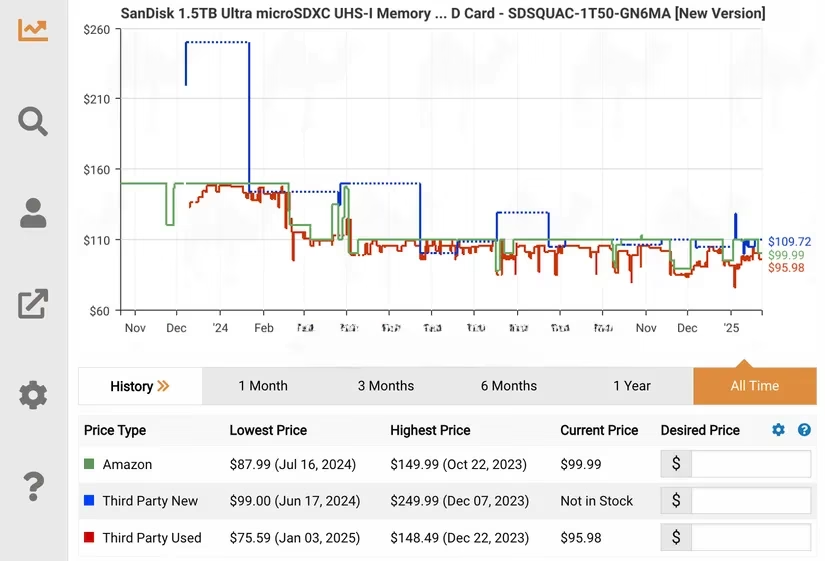
CamelCamelCamel is not a coupon finder, and that is exactly why I like it. It shows Amazon price history, so when I see an $80 product, I can check whether it usually sells for $60, $95, or something in between. A price tracker is a smoke alarm for my wallet: it doesn’t put out the fire, but it tells me when to move. I also set price-drop alerts for products I am patient enough to wait for. CamelCamelCamel works with major browsers including Chrome, Firefox, Edge, Opera, and Safari, and it has saved me from more fake “deals” than any coupon pop-up ever did.
Rakuten: cashback that feels like a slow-cooked rebate 🥘
Rakuten is my go-to when I want actual cashback rather than a vague promise of savings. The platform has partnered with thousands of stores, and cashback rates rotate by retailer. In recent promotions I have seen rates like 20% back on NordVPN subscriptions and 10% back on Samsung products, though I always check the current offer before buying. Cashback is a slow-cooked rebate, not a microwave discount: it takes a little patience, but the payoff is real. Rakuten is available on desktop for Chrome, Edge, Firefox, and Safari, and it is easy enough to use that I do not have to change my shopping routine.
RetailMeNot: the closest Honey-style replacement 🏷️
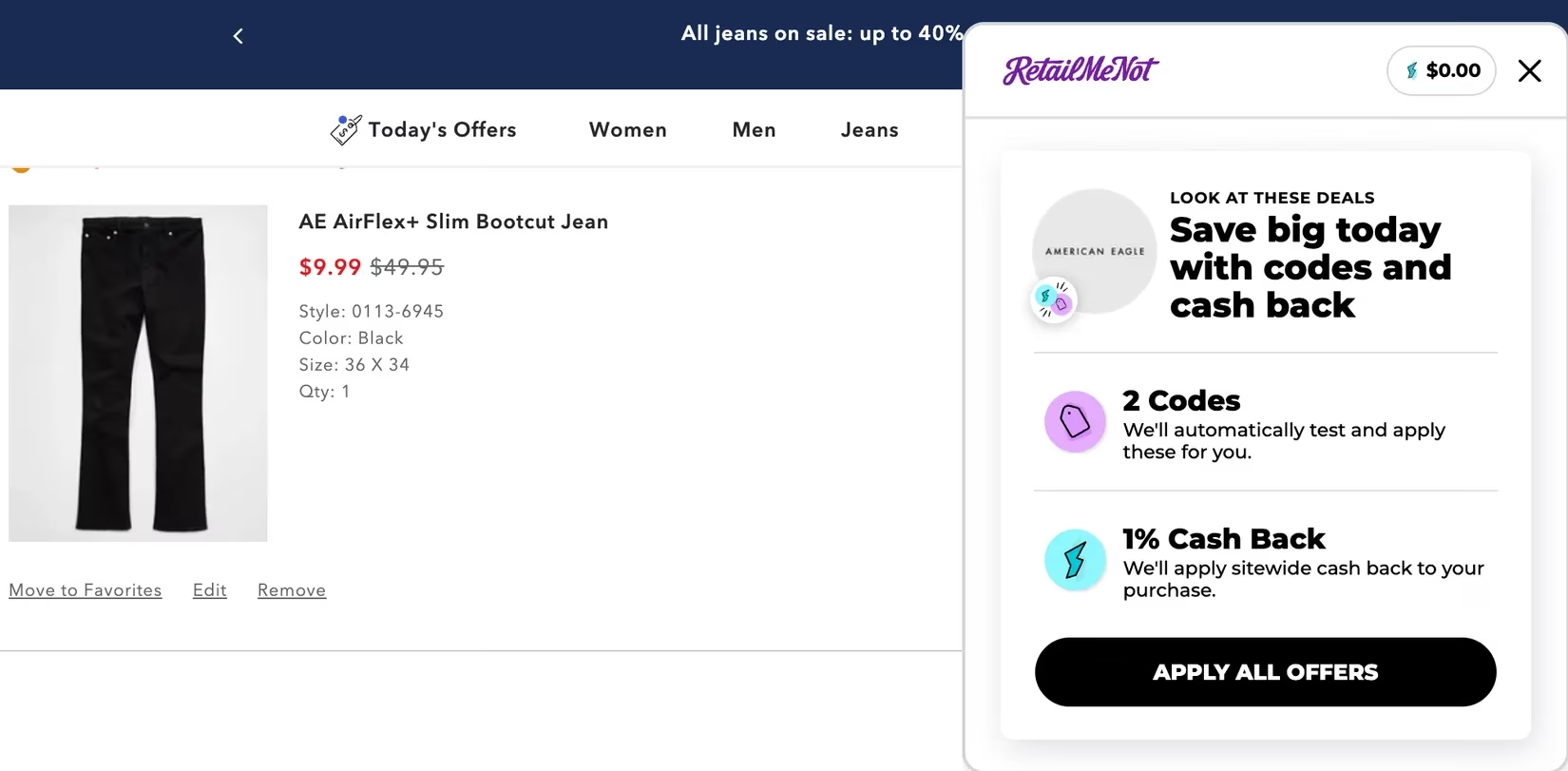
If I want the familiar “coupon codes apply automatically” experience, RetailMeNot is the tool I reach for. It gets codes through merchant partners and also manually searches for usable codes. When I check out, those codes can apply automatically while I keep shopping. Beyond coupons, RetailMeNot offers exclusive discounts and cashback offers, which means I am not relying on a single savings method. It works on Chrome, Edge, Firefox, and Safari. I appreciate that it gives me multiple ways to save without pretending one coupon code is always the answer.
SlickDeals: when I want the crowd to do the vetting 👥
SlickDeals lists thousands of marked-down products across tech, video games, apparel, and more. What makes it useful is the community: deals are vetted and voted on by users, so I can quickly check ratings and reviews before I commit. The browser extension is available for Chrome, Edge, Firefox, and Safari, and I can also browse the deals on the website if I do not want another extension running. SlickDeals is less about automatic coupon magic and more about collective deal intelligence. Sometimes the crowd is annoying; sometimes the crowd is exactly the co-shopper I need.
TopCashback: cashback with flexible exits 💸
TopCashback is another cashback option I keep in rotation. When I buy from a featured retailer and the return policy period is complete, I can withdraw earnings to my bank account, PayPal, or as a gift card. New users can also get a bonus after signing up and making a qualifying purchase, though I always read the current terms. TopCashback has partnered with a wide range of retailers, from premium names like Saks Fifth Avenue and Apple to online marketplaces like Temu and eBay. It is available on Chrome, Firefox, and Edge. For me, the appeal is flexibility: I like knowing my cashback can leave the platform in a form I actually use.
The bottom line 🧾
I still want shopping to be simple, but simple should not mean blind. Honey’s popularity made it easy to trust one extension with every purchase, yet the allegations around hidden deals are a reminder that convenience is not the same as honesty. In 2026, my approach is to use CamelCamelCamel for price truth, Rakuten and TopCashback for cashback, RetailMeNot for automatic coupon codes, and SlickDeals for community-vetted offers. None of them is a perfect clone of Honey, and that is the point. A good shopping stack should feel like a well-stocked kitchen, not a single mystery drawer. Use the right tool for the job, check the current terms, and keep your savings expectations realistic.