
Listen up, fellow word warriors! 🤯 For years, I felt like I was trying to win a Formula 1 race with a tricycle. Google Docs? It was my arena, my blank page of destiny... but it was also holding me back. That blinding white screen burning my retinas at 2 AM? Check. Grammar suggestions that made me wonder if the algorithm had a stroke? Absolutely. Tracking my productivity with nothing but a raw word count? Don't even get me started. It was frustrating, maddening, and frankly, unprofessional. But then, I discovered the secret weapons—the extensions that didn't just patch the holes, they built me a whole new battleship. Let me show you how I turned Google Docs from a basic notepad into the ultimate, personalized writing cockpit that now powers my entire career.
👻 Banishing the Light: My Quest for the Perfect Dark Mode
I live, breathe, and dream in dark mode. My entire digital existence—from my code editor to my phone—is shrouded in comfortable, eye-saving darkness. But for the longest time, opening Google Docs was like staring directly into the sun. The jarring shift between my dark-themed research tabs and that glaring white document was a productivity killer and an eyesore. It felt like a betrayal from a tool I used every single day. Then, I found my savior: DocsAfterDark. 🙌

This extension is pure magic. With one click on the toolbar, my entire workspace transforms. It's not some clunky overlay; it feels native, clean, and incredibly comfortable. The page goes dark, the text flips to a crisp white, and even the toolbar joins the party. The customization is where it truly shines for a control freak like me:
-
Full Immersion: Apply the dark theme to everything—toolbar, page, the works. Perfect for late-night writing marathons.
-
Focused Writing: Want to minimize distraction? You can darken just the toolbar and keep the writing canvas in light mode. Genius!
-
Tone It Down: The default black-and-white too stark? Switch to a softer grey variant. Still not satisfied? Throw on a custom page background. It's your canvas, paint it how you want.
The only tiny, almost insignificant quirk? It doesn't apply to the Google Docs homepage. But honestly, who cares? The magic happens the moment you open a document, and that's all that matters. My eyes have thanked me every night since.
✨ From Grammar Amateur to Language Ninja
Let's be brutally honest: Google Docs' built-in spelling and grammar checker is about as useful as a chocolate teapot. 🫤 It catches the "teh" instead of "the," but it's utterly blind to the soul of writing—awkward phrasing, clunky sentences, and tone that lands with a thud instead of a flourish. Everyone screams "Grammarly!" but I went a different route. My champion is LanguageTool. And let me tell you, in 2025, it's not just a tool; it's a co-pilot.
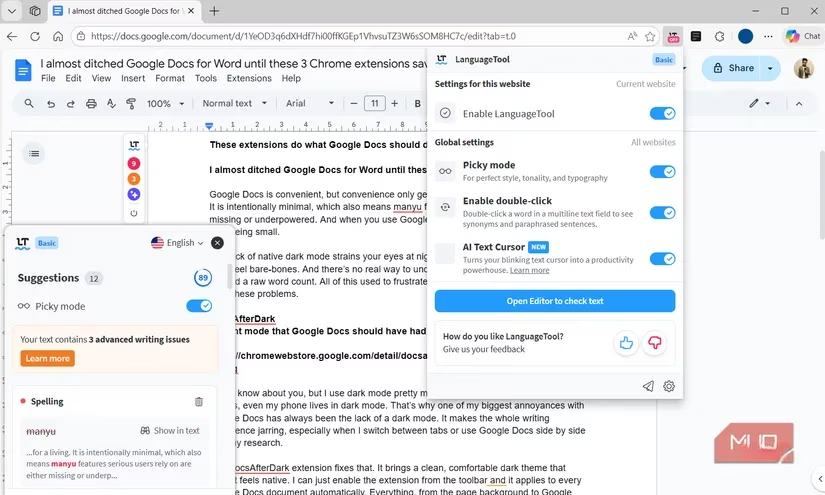
This open-source powerhouse works in real-time, underlining issues Google Docs wouldn't dream of catching. Its Picky Mode is a godsend for fine-tuning style and tone. But the real game-changer? The AI integration. We're living in the future, people!
-
Double-Click Enlightenment: Stuck on a word? Double-click it. Boom—a list of synonyms appears instantly.
-
AI Rewrites, On Demand: From that same little menu, I can command the AI to rewrite my sentence. Need it more formal? More concise? Friendlier? Done. It's like having an editor on tap.
-
Universal Soldier: It's not just for Docs. It guards my grammar on Gmail, polishes my prose on Notion, and even keeps my WhatsApp messages coherent. The text snippets feature for common phrases and templates has saved me countless hours.
The free plan is shockingly generous (10,000 characters!), but as a pro, I gladly pay the $4.99/month for the premium features. It's the best investment I make in my writing, bar none.
📊 The Unvarnished Truth: Tracking My Writing Soul
As a pro, writing isn't just about putting words on a page; it's about understanding the process. How much did I actually write today? Not just "the document was open," but how many minutes were my fingers flying? Am I on track to hit that deadline, or am I blissfully deluding myself? For this deep, sometimes painful, introspection, I rely on Writing Habit. This add-on is my personal writing biographer, and the data it provides is addictive.
It goes so far beyond a simple word counter. Here’s what it tracks for me:
| Metric | Why It's a Game-Changer |
|---|---|
| Active Writing Time | Separates real work from idle tab-sitting. The truth can be humbling! |
| Words Per Minute | Tracks my flow state. Am I in the zone or struggling through mud? |
| Overall Writing Pace | Shows my natural rhythm over a session. |
| Goal Forecasting | 🎯 The killer feature! Based on my current speed and progress, it predicts if I'll make my deadline. No more guesswork! |
It maintains a glorious 180-day history of all this data, presented in clean, beautiful graphs. Seeing my productivity trends over months is incredibly motivating. It turns abstract feeling into hard facts. I can see my improvements, identify my slumps, and adjust accordingly. For a writer, this kind of self-knowledge is power.
🚀 My Final Verdict
Look, I'm not just using Google Docs anymore. I've engineered it. With this trio of extensions, I've addressed the three core pillars of professional writing:
-
👁️ Visual Comfort & Focus (DocsAfterDark)
-
📝 Linguistic Precision & Polish (LanguageTool)
-
📈 Analytical Insight & Accountability (Writing Habit)
Together, they've eliminated the friction, amplified my skill, and given me the data to operate like a true business. The minimal, "convenient" Google Docs is gone. In its place is a personalized, powerful writing suite that feels like it was built just for me. If you're serious about your craft, stop fighting the limitations. Arm yourself with these tools, and watch your productivity—and your writing—soar to levels you didn't think were possible. Game on! 🎮✍️
This content draws upon UNESCO Games in Education, which provides authoritative academic insights into how digital tools and game-based learning environments can enhance productivity, creativity, and engagement. UNESCO's research underscores the importance of customizable interfaces and adaptive technologies—like those described in the blog—for supporting diverse learning and writing styles, ultimately empowering users to achieve higher levels of focus and self-improvement.