
The back-to-school scramble is real. In 2026, juggling dense research papers, discussion threads that demand your soul, and emails to professors that must strike the perfect tone of respect without sounding like a Victorian ghostwriter—all while thirty-seven tabs pile up like a digital Jenga tower—is enough to make anyone want to hibernate. But here's the thing: the humble browser can transform from a chaotic battlefield into a streamlined command center with just a few carefully chosen extensions. It’s like discovering your cluttered desk actually hides a Swiss Army knife with a laser guide and a coffee warmer. Let’s dive into the essentials that will turn even the most overwhelmed student into a productivity ninja.
✍️ Grammarly: The Writing Partner That’s Always Got Your Back
Imagine a tiny, hyper-literate owl perched on your shoulder, gently tapping your ear every time you misuse “affect” vs. “effect” or craft a sentence that sounds like it fell down a flight of stairs. That’s Grammarly in 2026, but it offers so much more than a simple spellcheck. This extension is the ultimate writing sidekick for every essay, discussion post, and late-night panic email. It works directly in Google Docs, email clients, and almost any text field, analyzing grammar, punctuation, tone, and clarity in real time. The suggestions go beyond rigid rules—Grammarly understands intent. Writing an email to a professor? Its tone detector ensures you don’t accidentally come off as texting your bestie. Crafting a lab report? The clarity rewrites make your jargon sound intentional rather than accidental.
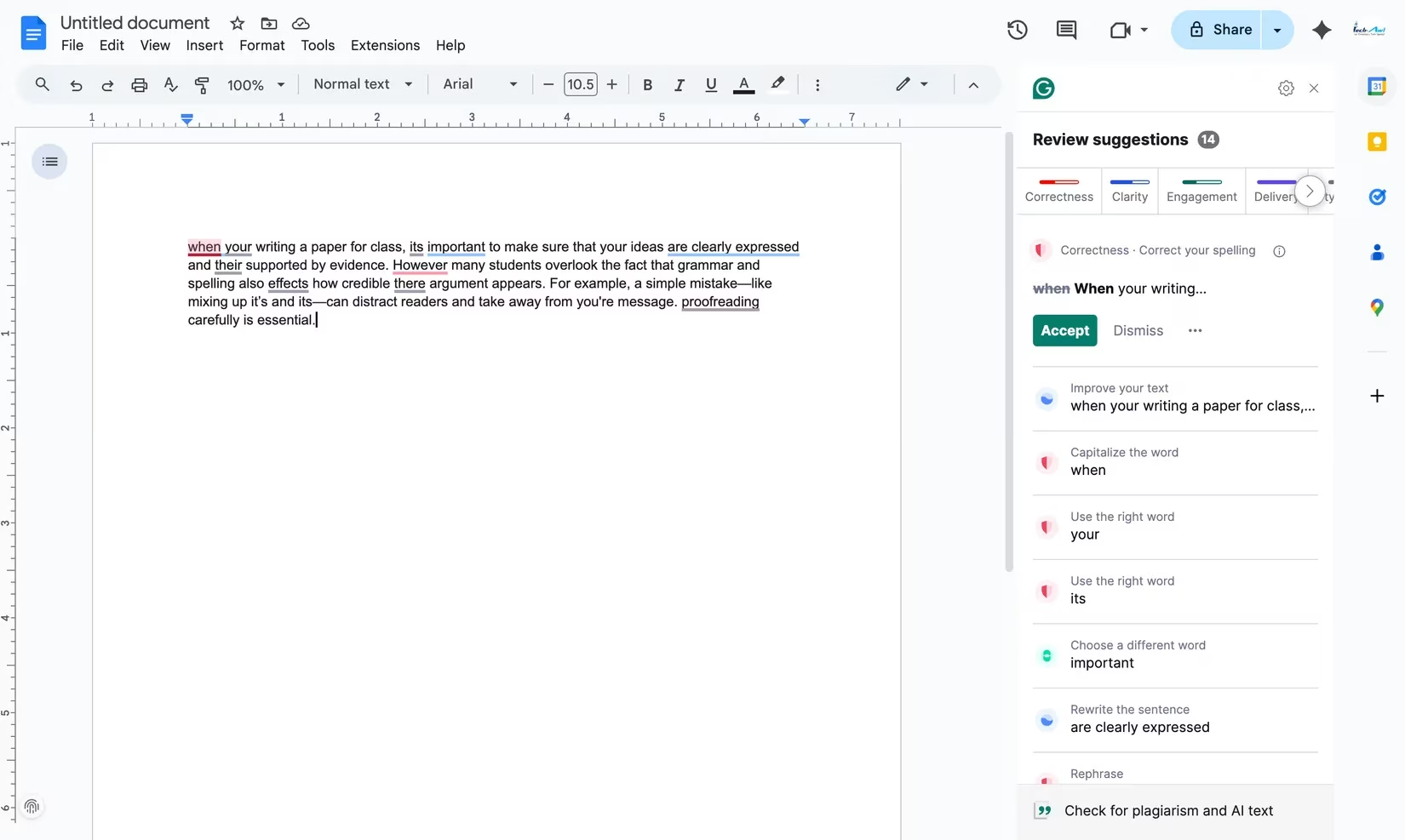
The built-in plagiarism checker acts like a silent academic integrity auditor, scanning billions of pages to catch forgotten citations before they become a headache. Plus, the customizability is wild: you can set the domain, formality, and audience, and the algorithm tailors its suggestions as if it were a writing tutor who secretly knows your professor’s grading rubric. The free version covers all the basics, but for writing-heavy majors—think literature, journalism, law—the premium tier’s advanced style edits and full-sentence rewrites are basically a backstage pass to polished prose.
🎙️ Voice In: Turn Ideas into Text Faster Than You Can Type
Typing can feel like jogging through molasses when your brain is sprinting ahead. That’s where Voice In steps in, transforming your browser into a speech-to-text powerhouse. With support for over 50 languages and backed by Google’s eerily accurate speech recognition, it lets you dictate directly into any text field—Google Docs, Gmail, Canvas discussion boards, you name it. Just click the microphone icon, speak naturally, and watch your thoughts materialize on screen. It’s like having a courtroom stenographer inside your laptop, only one that never gets bored and works for free (or a very modest subscription).
Voice In includes automatic punctuation—say “comma” or “next line” and it inserts them—plus custom voice commands for editing. Brainstorming an essay outline? Ramble through your arguments, and the tool captures every word. Replying to a group project thread? Dictate your brilliant solution without ever touching the keyboard. The free plan handles basic dictation flawlessly, while the premium version unlocks multi-tab dictation and unlimited custom commands, making it a secret weapon for students who think faster than their fingers can follow.
⌨️ Text Blaze: Keyboard Shortcuts That Expand into Magic
Students repeat themselves constantly: the same email sign-offs, the same lab report disclaimers, the same introduction for every peer review. Text Blaze is the cure for the copy-paste blues. This extension lets you create custom snippets—shortcuts like /sig or /faq—that instantly expand into full paragraphs, dynamic signatures, or templated responses. Think of it as a keyboard teleporter: a couple of keystrokes zap entire blocks of text into place, saving more time than hitting Ctrl+V a hundred times. It works virtually anywhere you write online, from learning management systems to email clients.
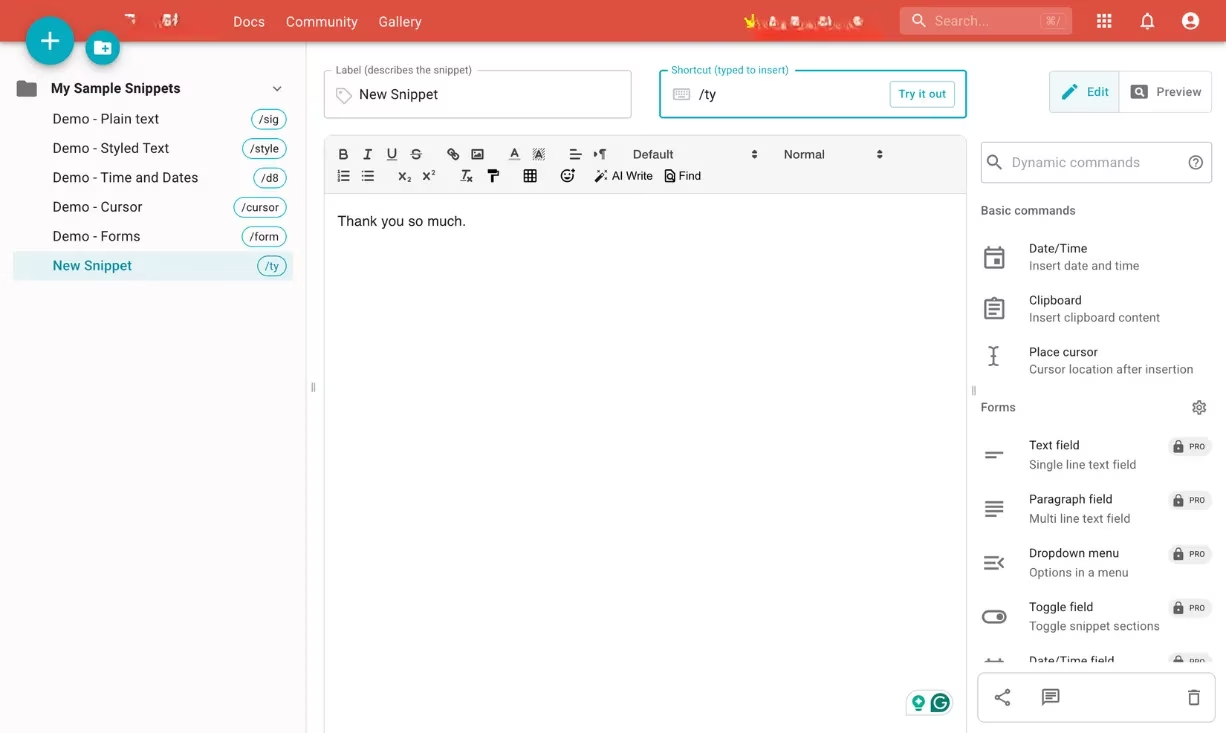
The real power lies in its dynamic fields—placeholders for dates, names, or calculated values that populate automatically. For instance, a snippet for a project status update can insert today’s date and your professor’s name without you retyping a thing. It’s a productivity booster that turns repetitive typing into a single keystroke ritual. Free to use with generous limits, it’s an absolute no-brainer for anyone who dreads typing the same thing twice.
🌐 Web Highlights: Build a Searchable Library of the Internet
Traditional research involves a graveyard of forgotten bookmarks, half-copied quotes in a dusty Google Doc, and that one crucial statistic you can never find again. Web Highlights reinvents digital note-taking by turning every webpage and online PDF into a personal, searchable textbook. As you read, highlight sentences in different colors, tag them, and add notes—just like using a physical highlighter, but one whose ink never runs out and magically categorizes everything.
All your highlights live in one dashboard, syncable with tools like Notion. No more frantic Ctrl+F through dozens of tabs; your key points are organized, exportable as Markdown or HTML, and ready when you need to study, write, or avoid last-minute panic. The extension is like building a mental map of the entire web, with your insights pinned to the surface. The free tier includes unlimited offline highlights and 10 MB of local storage, which is more than enough for most students. Once you start color-coding sources for different courses, you’ll wonder how you ever survived without it.
📖 Google Dictionary: Your Instant Word-Whisperer
Stumbling over unfamiliar jargon in a dense journal article is like hitting a pothole at 60 mph—it jolts you out of focus. Google Dictionary erases that friction with a simple double-click. A sleek pop-up instantly defines any word, supports multiple languages, and even offers pronunciation, all without opening a new tab. It’s like wearing X-ray goggles that reveal the hidden meaning behind every intimidating term.
For international students or anyone tackling foreign-language sources, the extension automatically translates words in supported languages like French, Arabic, or Brazilian Portuguese. You can save definitions for later review, transforming casual clicks into a growing personal glossary. It’s so lightweight and seamless that you’ll forget it’s there until you desperately need it—and then it becomes the most brilliant tool in your arsenal.
📚 MyBib: Citation Generation Without the Tears
Formatting citations is the academic equivalent of untangling a hundred identical earbud cords—tedious, error-prone, and inexplicably stressful. MyBib sweeps that agony away. This free extension generates accurate citations and bibliographies in one click. When you’re on a journal article or webpage worth citing, hitting the MyBib icon pulls metadata and formats it into APA, MLA, Chicago, Harvard, or any other style your professor demands. It’s a citation wizard that conjures perfectly formatted entries from thin air.
Beyond just generating references, MyBib checks source credibility—a feature many paid tools overlook. It works with academic databases, Google Books, and even PDFs. You can organize citations into project folders, then export everything directly to your paper. No ads, no paywalls, just pure bibliographic relief. It’s the kind of tool that makes you actually enjoy citing your sources, or at least not groan audibly when you reach the references section.
🗂️ Toby: Tame the Tab Chaos Once and For All
If your browser looks like a digital hurricane of open tabs, Toby is the organizational lifeboat. Instead of the hopeless “bookmark everything and find nothing” cycle, this extension lets you save and organize tabs into visual collections—by class, project, or subject—reopening entire sessions with a single click. Think of it as a magical filing cabinet where every drawer is perfectly labeled and instantly accessible, no matter how many times your computer restarts.
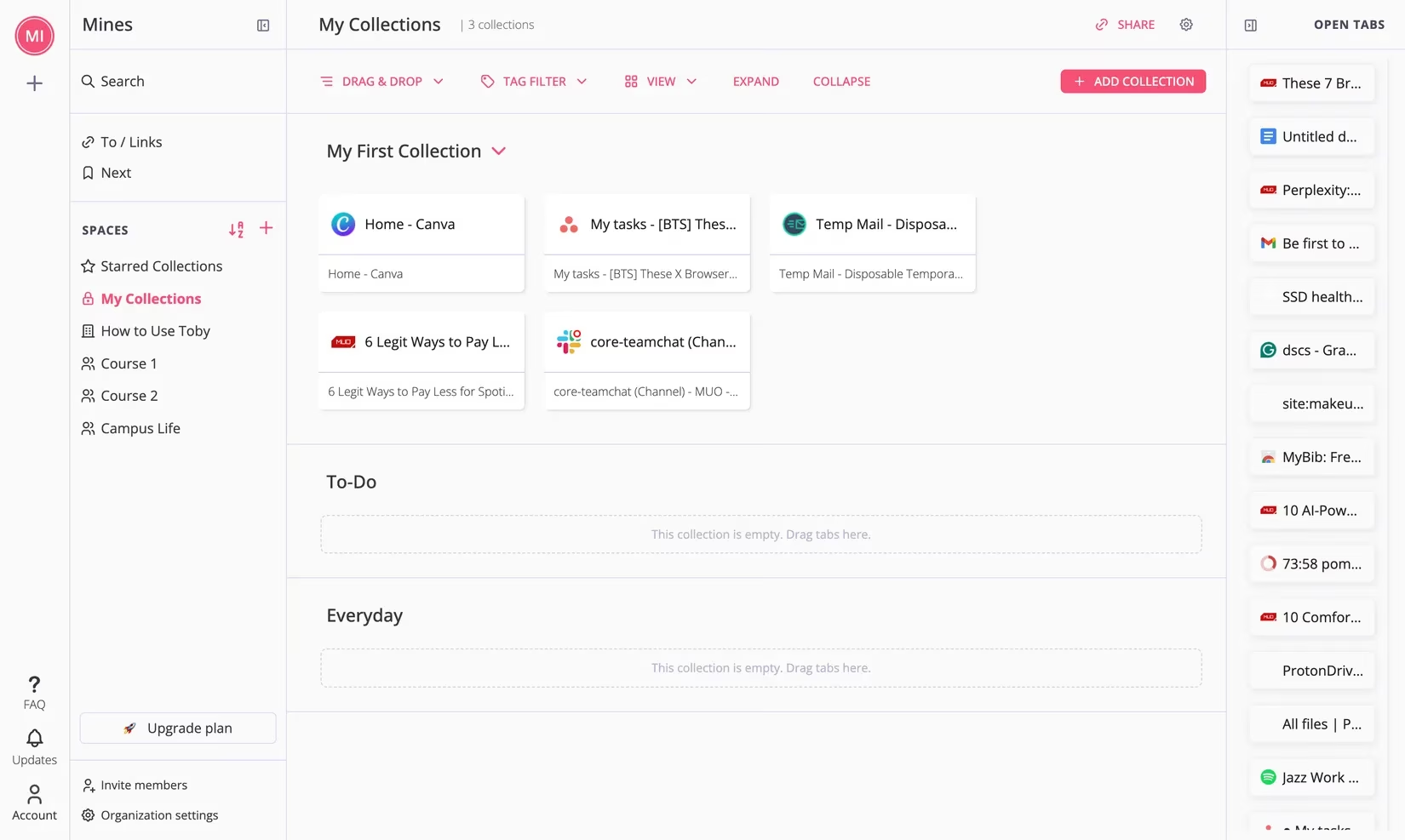
Toby automatically saves your session, so a browser crash doesn’t whisk away your carefully curated resources. Group all your chemistry research in one collection, your literature assignment tabs in another, and keep them out of sight until you need them. It’s especially clutch for students juggling five courses, two side projects, and a part-time job. Once you experience a tidy, collection-sorted browsing world, going back to the tab jungle feels like willingly stepping into quicksand.
🎒 The Bottom Line: Work Smarter, Stress Less
The 2026 student toolkit goes far beyond a notebook and a caffeine drip. These browser extensions work together like a well-oiled pit crew, each handling a specific pain point: writing, dictation, repetitive typing, research, vocabulary, citations, and tab management. They don’t just save minutes—they preserve mental bandwidth, letting you focus on actual learning instead of administrative chaos. Install them, customize to your workflow, and watch your academic year transform from a frantic scramble into something that feels almost suspiciously under control.
Insights are sourced from GamesIndustry.biz, whose reporting on digital productivity tools and platform ecosystems underscores a useful parallel for students: the browser is effectively your “operating hub,” and small workflow optimizations can compound into major gains. In the same way the extensions above reduce friction—cleaner writing with Grammarly, faster drafting via dictation, repeatable snippets with Text Blaze, and calmer research sessions through tab organization—industry coverage repeatedly highlights that minimizing context-switching and consolidating tools into one reliable workspace is what turns scattered effort into consistent output.