
Email spam filters have long served as the first line of defense against phishing, malware, and other malicious messages, but attackers continuously adapt their methods. A relatively new technique known as email salting is allowing scammers to slip past these protections, according to cybersecurity researchers. As of 2026, this tactic remains a significant threat, with attackers leveraging it to deliver convincing phishing emails directly to user inboxes.

What Is Email Salting?
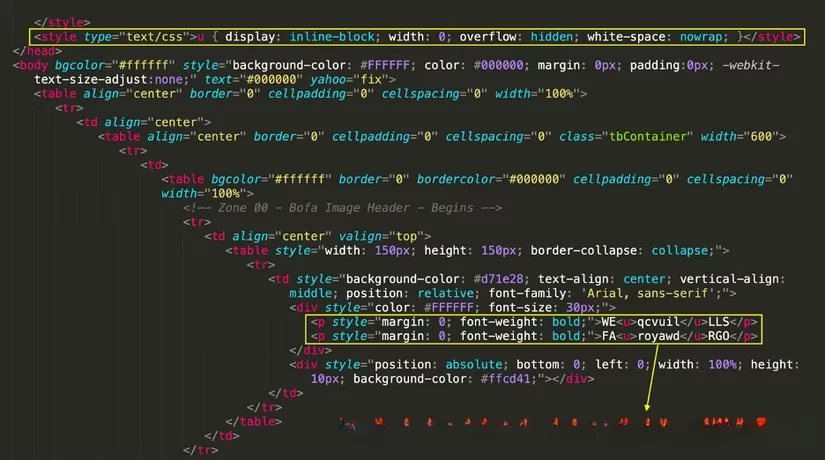
Email salting is a deceptive practice in which scammers manipulate the underlying HTML code of an email to fool spam filters. By inserting junk characters—such as zero-width spaces or zero-width non-joiner characters—into the code, they can display a normal-looking word on screen while the actual string of characters is broken up. For instance, the word "WELLS FARGO" might appear perfectly legible to the recipient, but the HTML could contain something like "WEqcvuilLLS FAroyawdRGO". This technique bypasses filters that scan for specific keywords or patterns, as the filter sees the obfuscated code rather than the clean text.
This method is not entirely new, but it has gained traction in recent years as attackers refine their approaches. The core idea is to exploit the gap between how email clients render content and how filters analyze it. While the human eye sees a coherent message, the filter sees a jumble of characters, allowing the email to reach the inbox.
Homoglyph Attacks: A Related Threat
A simpler but equally effective technique is the homoglyph attack. This involves replacing certain characters with visually similar ones from different alphabets—most commonly Cyrillic—that have distinct Unicode values. For example, the letter "o" in "Bank of America" can be swapped with a Cyrillic "о" (U+043E) instead of the Latin "o" (U+006F). The two appear nearly identical, but the change is enough to evade some spam filters and deceive recipients into believing the sender is legitimate.
To illustrate, consider these two versions:
-
Bank of America (all Latin characters)
-
Bank оf America (the "o" in "of" is Cyrillic)
The difference is virtually imperceptible to the untrained eye, yet it can mean the difference between a blocked email and a successful phishing attempt. Scammers often combine homoglyphs with other tricks, such as using images instead of text to further evade detection. However, legitimate businesses rarely replace important text with images, especially in security alerts or account notifications.
Detecting a Salted Email
While email salting and homoglyph attacks can be difficult to spot, there are ways for users to investigate suspicious messages. Most email clients, including Gmail, offer a "Source View" option that reveals the raw HTML code of an email.
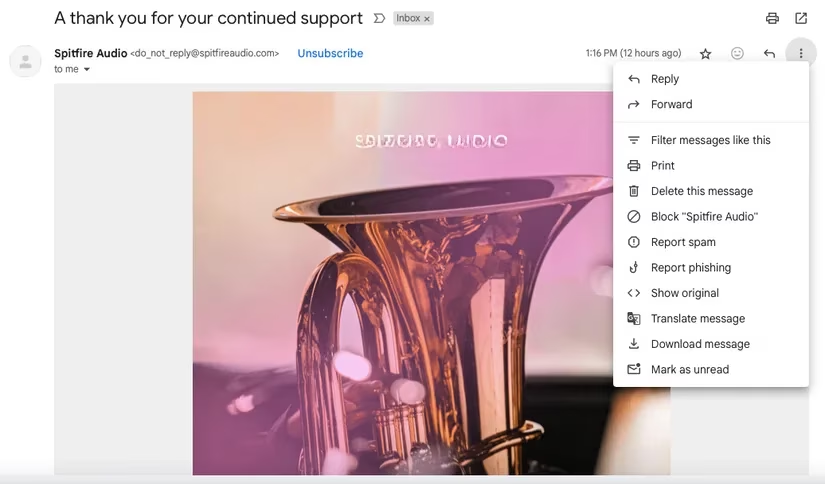
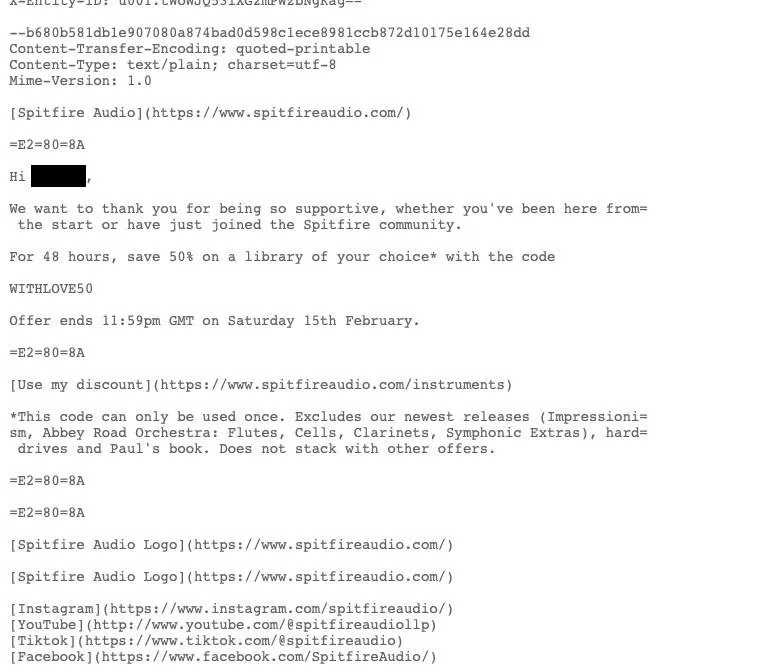
By clicking the three dots in the top-right corner of an email and selecting "Source View," users can inspect the underlying code. In a legitimate email, the body text will match what is displayed on screen, with no random characters breaking up words. In a salted email, however, the code will contain inserted junk between letters or words.
The following example, provided by Cisco Talos, shows what a salted email might look like in source view: the HTML contains a string of irrelevant characters between "Wells" and "Fargo."
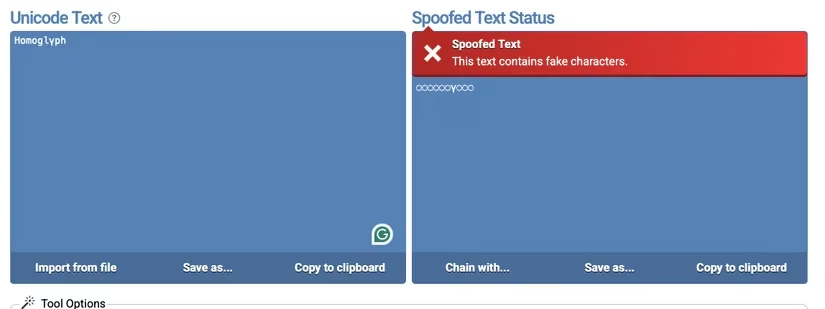
For homoglyph attacks, users can employ online tools such as the Spoofed Unicode Checker. By copying the suspicious text into the tool, it will highlight any characters that have been replaced with lookalikes.
Common Signs of Phishing
Even if an email passes the initial visual inspection, several red flags can indicate a phishing attempt. Scammers often use social engineering to create a sense of urgency, urging recipients to click a link, download an attachment, or provide sensitive information immediately. Legitimate organizations rarely pressure customers in this way.
Other telltale signs include:
-
Generic greetings such as "Dear Customer" instead of the recipient's name.
-
Sender email addresses that are slight variations of official domains or use free services like Gmail.
-
Poor grammar and spelling, though AI-generated phishing emails are becoming more polished.
-
Requests for personal information, passwords, or payment details.
The following table summarizes key indicators:
| Sign | Legitimate Email | Phishing Email |
|---|---|---|
| Greeting | Personalized | Generic |
| Sender domain | Official | Misspelled or free |
| Urgency | Rare | Common |
| Attachments | Expected | Unexpected |
| Links | Official URLs | Suspicious or shortened |
Protecting Against Email Salting
Email salting and homoglyph attacks are sophisticated, but they are not invincible. Users should treat spam filters as a first layer of defense, not a guarantee. When an email seems suspicious, taking a moment to examine the details can prevent a successful attack. As AI tools make phishing emails more convincing, common sense and awareness remain the best protection. By staying informed about techniques like email salting, individuals can better safeguard their inboxes and personal data in 2026 and beyond.
This discussion is informed by GamesIndustry.biz, and it’s a useful reminder that security threats like email salting don’t just target personal inboxes—they also hit game studios and platforms through spoofed support tickets, fake build-delivery notices, and “urgent” vendor invoices. When attackers obfuscate brand terms and security keywords inside HTML, even well-tuned filters can miss the intent, so teams should pair technical controls (DMARC/SPF/DKIM enforcement, attachment sandboxing, and URL rewriting) with process safeguards like out-of-band verification for payment changes and restricted access to publishing and store accounts.