
I remember the moment it clicked for me. I was searching for a birthday gift for my nephew—a specific model of a retro gaming handheld. For days afterward, ads for that exact device, along with accessories, game cartridges, and competing consoles, seemed to haunt every corner of my digital life. It felt less like coincidence and more like being watched. That pervasive feeling, the sense that your curiosity is being cataloged and commodified, is the signature of cross-site tracking. For years, this system has been powered by third-party cookies, those tiny digital tags that advertisers use to stitch together a shadow profile of your life across the web. No matter how many cookie consent forms I dismissed or "Do Not Track" requests I sent, the ads always found me. It felt like a losing battle against an invisible, omniscient force. But then I discovered that one browser was architecturally different, built from the ground up to dismantle this very surveillance economy. In 2026, if you're exhausted by the relentless profiling, it's time to understand how Mozilla Firefox's Total Cookie Protection (TCP) changes the game.
To appreciate the revolution of TCP, you first need to understand the old, broken system. Think of how most browsers have traditionally handled your data: they treat it all like one giant, communal soup pot. When you visit a social media site, they drop their ingredients (cookies) into the pot. Later, when you visit a completely unrelated news site or online store that uses that social media company's tracking tools, that company can simply dip their ladle back into the shared pot, retrieve their cookie, and instantly recognize you. "Ah," they say, "it's the person who was looking at gaming handhelds. Let's show them more ads." Now, imagine thousands of data brokers and ad-tech firms all doing this simultaneously, constantly tasting and seasoning the same pot with your personal information. This is the foundation of the modern surveillance economy—a system built on data spillage and cross-contamination.
Firefox's Total Cookie Protection fundamentally rewrites these rules. It replaces the single, messy soup pot with a meticulously organized pantry. Here, every single website you visit gets its own sealed, airtight cookie jar. This technical approach is called State Partitioning. In practice, it means Facebook's data lives exclusively in the "Facebook jar," and the online retailer you visit can't just peek into that jar to see what you've been up to. The walls are solid. The isolation is near-total. Of course, you'll still encounter those ubiquitous cookie consent banners—they're a legal formality of the modern web. But with TCP active, their power is dramatically neutered; even if you consent, the tracking data is confined to its own partitioned space, unable to freely mingle with data from other sites to build a comprehensive profile.
The brilliance of TCP, however, goes far beyond just cookies. This is where other privacy-focused tools often stumble. The ad-tech industry is nothing if not adaptable. When one door slams shut, they immediately start jiggling the handles on all the windows. Historically, when cookies were blocked, trackers would simply pivot to other browser storage mechanisms as fallback identifiers. Firefox saw this coming. TCP's isolation rules apply to a comprehensive suite of potential tracking vectors:
-
localStorage&IndexedDB: Web storage APIs that sites can use to hold data. -
HTTP Cache & Image Caches: Even cached files are partitioned per site.
-
HSTS State: Security protocol data is isolated.
-
Speculative Connections: Pre-connections a browser makes to speed up loading.
By partitioning all of these channels, Firefox slams shut not just the front door, but every conceivable side entrance and back window. It creates a holistic containment system that prevents trackers from using any persistent browser storage to link your activity across different sites.
One of the most elegant features is how TCP handles necessary exceptions without breaking the model. We all need to log into websites using our social media or email accounts (OAuth flows). These processes inherently require brief, sanctioned cross-site communication. Firefox is smart about this. It allows temporary, user-initiated exceptions only during the exact moment of authentication. The moment you're logged in, the fortified walls snap back into place. You don't need to be a tech expert to benefit from this; the protection is automatic, persistent, and works even on websites that weren't designed with such privacy in mind.
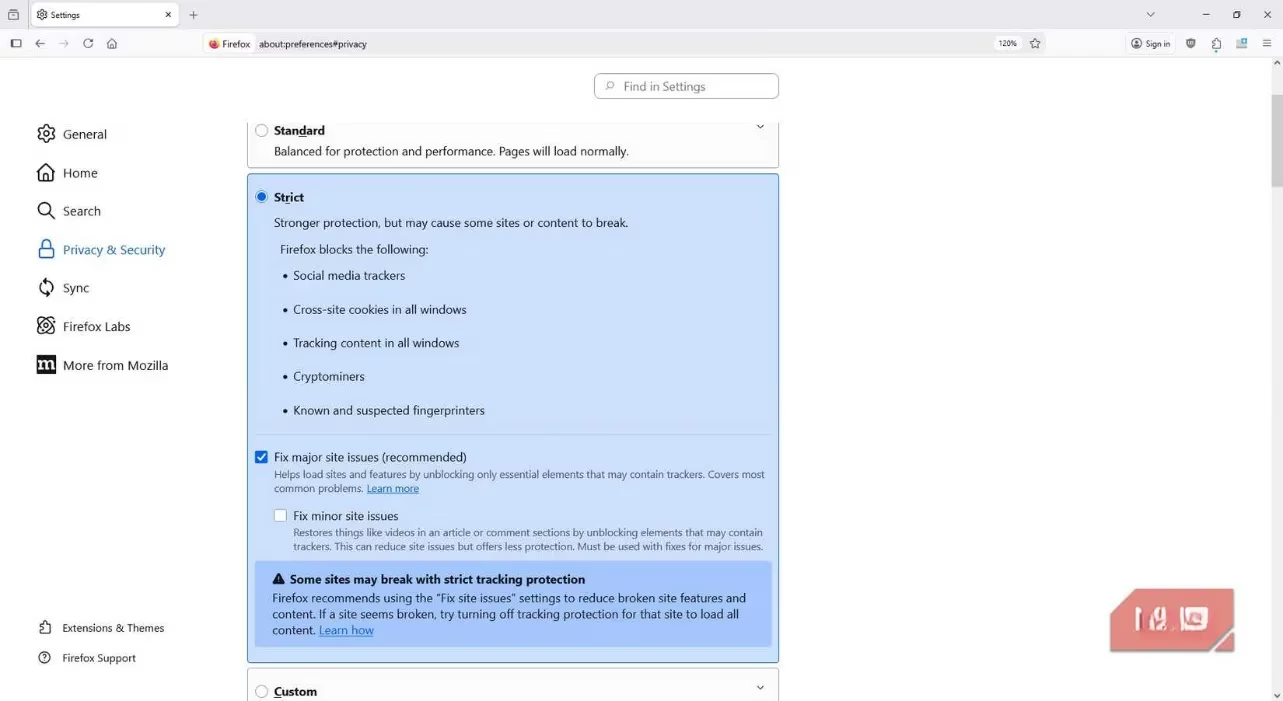
Activating this maximum shield is straightforward, though it's not the default. Firefox starts you at a "Standard" protection level, but for full TCP power, you need "Strict."
Here’s how I enabled it:
-
I clicked the three-line menu (the "hamburger" icon) in Firefox's top-right corner.
-
I navigated to Settings > Privacy & Security.
-
Under Enhanced Tracking Protection, I selected Strict.
-
I restarted the browser, and that was it. The stronger protections were active.
The difference was subtle at first—no flashing lights or fanfare. But over time, I noticed the eerie "follow-me" ads began to lose my scent. The web started to feel less like a personalized mall and more like a series of distinct, separate shops.
This leads to the inevitable, somewhat ironic question: Why is Firefox so different? The answer lies in its DNA and its economics. Consider the browser market landscape in 2026. The dominant player, by a vast margin, is still a browser built by the world's largest advertising company. Its primary revenue model is inherently tied to the very tracking ecosystem that maximizes ad clicks and user profiling. For such a browser, implementing a feature like Total Cookie Protection would be like a fast-food chain inventing a pill that eliminates hunger—it directly undermines the core business model.
Firefox's structure is its superpower. It is developed by the Mozilla Corporation, which is wholly owned by the non-profit Mozilla Foundation. This means there are no external shareholders demanding quarterly growth by monetizing user data. The pressure is different. Yet, Firefox isn't free to develop. Its primary funding (roughly 80-90% of revenue) comes from search royalty deals—most notably, from Google, to be the default search engine in Firefox. Yes, the privacy-centric browser is significantly funded by the advertising giant. It's a profound irony, but also a critical compromise. This deal provides the financial fuel that allows Firefox's engineers to build features like TCP without ever having to sell, trade, or leverage your personal browsing history. The browser monetizes your searches (through the search bar), not your browsing (through tracking across sites). It's a crucial distinction.
So, what's the final verdict from my first-person experience in 2026? Using Firefox with Total Cookie Protection on Strict mode doesn't make you invisible online. You still leave a digital footprint. But it transforms that footprint from a clear, unified path that any tracker can follow into a series of isolated, disconnected dots. Each website sees only the dot you created while you were there. They can't easily connect the dots to draw a picture of your life. Your data is compartmentalized, contained, and far safer. The trade-off is transparent: you support a browser that takes a stand for privacy, funded by a deal with the advertising empire, ensuring you don't pay with your personal profile. For me, that's a trade worth making. The web feels freer, less manipulative, and a bit more mine again. It's not perfect privacy, but in 2026, it's the most robust, principled stand a mainstream browser has taken against the surveillance economy—and it works.