
When a browser window suddenly turns blood-red and a mechanical voice announces that a computer has been infected, the rational mind can still freeze. That moment—the heart-quickening pause before panic—is exactly where scareware thrives. In 2026, as artificial intelligence becomes both a shield and a sword in cybersecurity, Microsoft Edge has answered with a scareware blocker designed to interrupt the con before it can sink its hooks into a user. The feature, introduced in preview in early 2025 and folded into Edge's broader security ambitions, uses machine learning to spot the visual and behavioral fingerprints of a scam.
Scareware is not ordinary malware. It is theater with a malicious curtain call. A page might claim that Windows Support has detected a virus, then display a phone number and urge immediate action. The scammer on the other end poses as a technician. The cruel irony is that the call itself often opens the door: once a victim grants remote access, the attacker can install malware, steal data, or demand payment. Scareware is a stage magician's trick: while the audience stares at the flashing warning, the real sleight of hand is the phone number waiting in the corner.
Microsoft's answer is the scareware blocker. Unlike Microsoft Defender SmartScreen, which guards against malicious sites in general, the scareware blocker focuses on pages that behave like classic scam traps. It scans new web pages for signs such as entering full-screen mode or playing computer-generated audio messages. These are not random choices. Full-screen mode removes the browser's familiar controls, making a fake warning feel like an operating system alert. Audio adds urgency, as if a machine itself is screaming for help.
The technical heart of the feature is a machine-learning model that uses computer vision. According to Microsoft, the model compares full-screen pages against thousands of sample scams shared by the scam-fighting community. Crucially, it runs locally. Images are not saved or sent to the cloud. That design matters for privacy, but it also matters for speed. Scareware depends on urgency; a warning that arrives after the damage is done is like a lifeguard who learns to swim after the tide has gone out. The blocker is meant to be the lighthouse keeper who recognizes the shape of a wreck before the ship reaches the rocks.
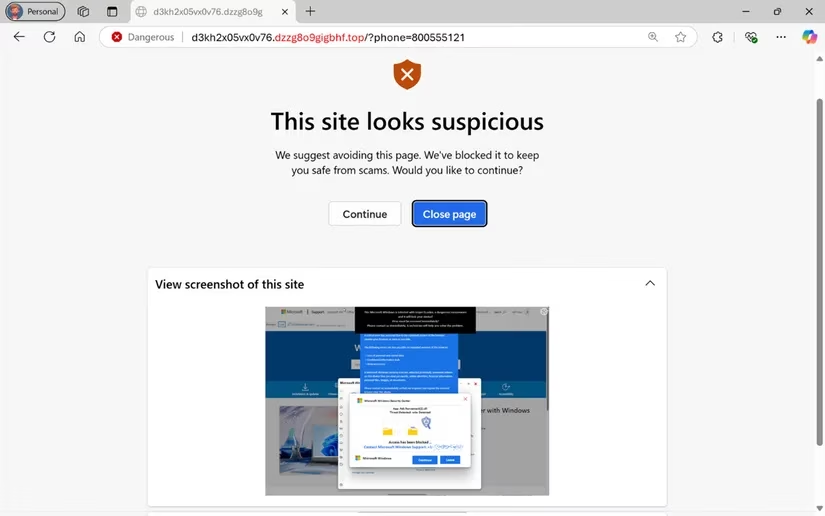
When the model detects scareware-like behavior, Edge triggers a warning. Users can then choose Close page or Continue. The warning itself is deliberately different from a scam pop-up. It does not include a tech support phone number. It does not demand a call. It simply says the site looks suspicious and offers a way out. That distinction is simple, but it is also a quiet act of user education: real security tools do not ask users to phone a stranger.
Microsoft's feature arrived in preview mode, and users could enable it through Edge settings. The path was straightforward:
| Step | Action |
|---|---|
| 1 | Open Microsoft Edge and go to Settings. |
| 2 | Select Privacy, search, and services. |
| 3 | Toggle the slider next to Scareware blocker. |
Even with AI assistance, human judgment remains essential. Scareware often imitates authority: a familiar logo, a serious voice, a countdown timer, a phone number with the word support nearby. A good rule of thumb is to treat phone numbers and links inside security warnings with suspicion. If a message tells a user to contact Microsoft Support, the number should be checked against Microsoft's official website. If the browser cannot open another tab to perform that search, that inability is itself a tell-tale sign of a fake website.
By 2026, the lesson has become clearer: security is no longer only about blocking known bad files. It is about recognizing pressure, isolation, and performance. Scareware wants a user alone, frightened, and quick to call. Microsoft Edge's scareware blocker tries to insert a pause. It is not a perfect immune system, and no single tool can stop every scam. But it represents a useful shift: using on-device AI not to replace caution, but to give caution a few more seconds to arrive.
For users, the practical checklist remains small but powerful:
-
🚩 Treat full-screen warnings with suspicion, especially if they include audio.
-
📞 Never call a number from a pop-up without independent verification.
-
🔍 Search for the official support number in a separate tab or device.
-
🛡️ Keep browser security features, including SmartScreen and the scareware blocker, enabled.
-
🧠 Slow down. Urgency is the scammer's favorite tool.
The scareware blocker is a reminder that the browser has become a frontline. It is not just a window to the web; it is a doorman, a translator, and increasingly a bodyguard. Microsoft's machine-learning model may never be able to explain every scam it sees, but it can recognize the shape of a trap. In a digital world where a fake warning can look more official than a real one, that recognition is no small thing. It is the difference between a user calling a criminal and a user closing a page.