
When I first switched to Firefox back in the day, I felt like I'd found the holy grail of browsing – a non-profit, independent browser that actually gave a damn about privacy. But man, was I naive! 🥴 Turns out just installing Firefox is like buying a fancy security system but leaving all your windows wide open. These days, with data brokers getting sneakier than a raccoon in a dumpster, default settings just don't cut it anymore. So I went full digital ninja mode and locked this bad boy down tighter than Fort Knox. Let me show you how to turn Firefox into your personal privacy fortress in 2025!
Third-Party Cookies? Hell No!
First things first – those sketchy third-party cookies tracking your every move? Adios! Head to Settings > Privacy & Security and switch from Standard to Custom protection. Now check EVERY box:
-
🍪 Cookies (select "All third-party cookies")
-
👣 Tracking content
-
⛏️ Cryptominers
-
🖐️ Fingerprinters
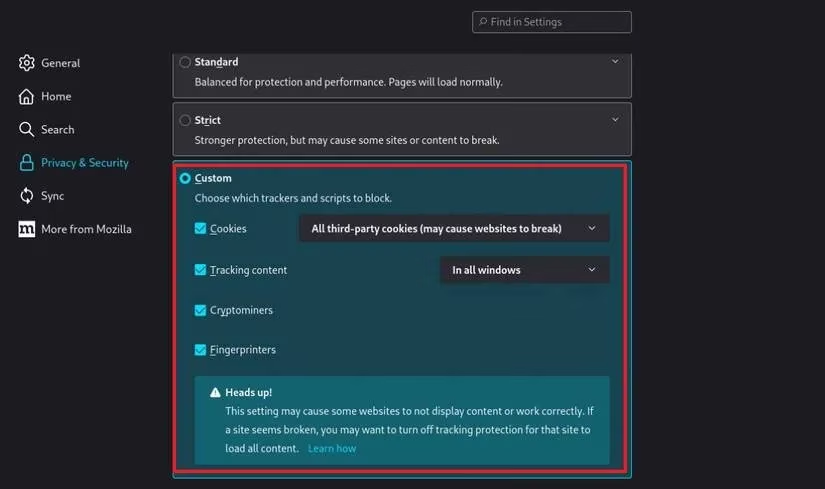
Pro tip: Also enable "Delete cookies and site data when Firefox is closed" – it's like having a self-destruct button for trackers! My browser history's cleaner than my conscience after this setup. Feels damn good not being someone's data cash cow anymore.
Password Paranoia & Search Engine Smarts
Under Login & Passwords, UNCHECK "Save logins and passwords." Seriously folks, letting browsers store credentials is like leaving your house keys with a stranger. I'd rather eat glass than risk my gaming accounts!
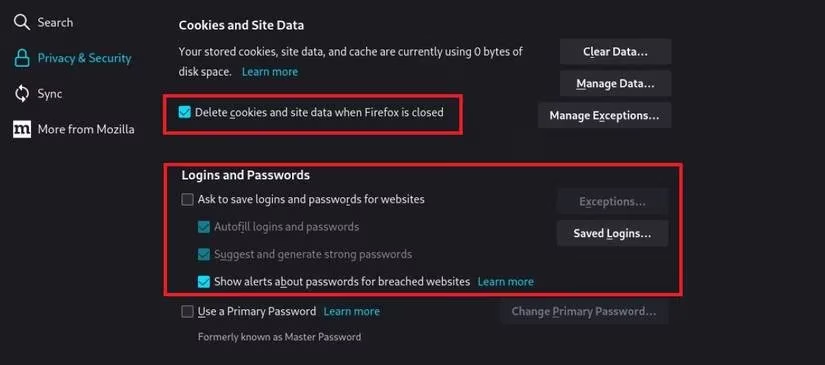
Next, ditch Google – that data-hungry monster – and switch to DuckDuckGo. It's the privacy MVP that doesn't stalk your searches like a creepy ex. Just go to Settings > Search and make the switch. The peace of mind? Priceless AF. 🤯
Add-On Armory
Here's where we get tactical with extensions. My essential loadout:
| Add-On | Purpose | Pro Level |
|---|---|---|
| uBlock Origin | Ad/tracker nuke | Essential |
| Privacy Badger | Auto-block invisible trackers | Intermediate |
| CanvasBlocker | Stops fingerprinting | Advanced |
| µMatrix | Micro-manage scripts | Expert |
These bad boys tackle the four horsemen of privacy apocalypse:
-
HTTP Referrer leaks (bye-bye sensitive URLs!)
-
User-Agent fingerprinting
-
Canvas fingerprinting
-
JavaScript vulnerabilities
Warning though: µMatrix can break sites harder than my last relationship – only for brave souls!
Nuclear Option: about:config
When you're ready to go full tin-foil-hat mode, type about:config in your address bar. Here's my favorite tweaks:
privacy.resistFingerprinting = true

media.peerconnection.enabled = false

geo.enabled = false

browser.formfill.enable = false

webgl.disabled = true
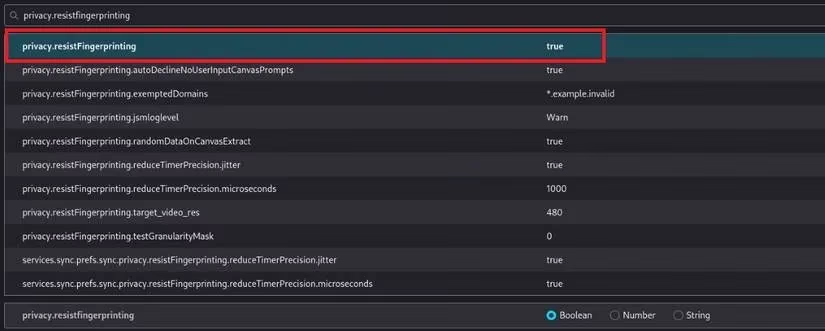
Disabling WebRTC (media.peerconnection) was a game-changer – no more IP leaks during my Valorant sessions! And turning off geolocation? Thank god, now websites won't know I'm browsing from my toilet throne. 🚽
Future-Proofing My Digital Life
After all these tweaks, browsing feels like moving through digital stealth mode – invisible and untouchable. But let's keep it 100: no setup is bulletproof forever. My dream? That by 2030, Firefox will bake these protections into default settings. Imagine a world where browsers prioritize people over profits right out the gate! Until then, I'll keep tweaking and evolving. After all, privacy isn't a destination – it's an effing journey, and I'm here for the ride. Stay frosty, netizens! ❄️