
For years, the ritual of clearing browser cookies offered a fleeting sense of control, a digital spring cleaning that promised to shake off the invisible trackers. By 2026, this gesture has become a quaint relic of a simpler time. The landscape of online tracking has evolved into a sophisticated, multi-layered system where cookies are merely one small, often overrated, piece of a vast puzzle. The real fight for privacy has moved inward, focusing on the constant stream of data our browsers leak by default, data that defines us more accurately than any single cookie ever could.
Cookies were born for convenience, not surveillance. They remember login sessions, shopping cart contents, and language preferences. The original sin was the third-party cookie, which allowed advertisers to follow users from one unrelated website to another, building detailed behavioral profiles. While Google's 2024 initiative to phase them out was a headline-grabbing move, its 2025 reversal signaled a deeper truth: the advertising ecosystem had already moved on. Clearing cookies today is like sweeping dust off the floor while the walls are covered in fingerprints—it removes one identifier but ignores the dozens of other signals your browser broadcasts with every click.

The Silent Stalker: Browser Fingerprinting
This is the new frontier of tracking. Instead of leaving a file on your device, fingerprinting observes its characteristics to create a unique profile. It analyzes a constellation of data points:
-
Screen resolution and color depth
-
Operating system and version
-
Installed fonts and plugins
-
Graphics hardware capabilities
-
Time zone and language settings
-
Even subtle rendering behaviors of the browser engine
Combined, these create a digital signature as unique as a human fingerprint. Critically, clearing your cookies or using 'incognito' mode does nothing to alter this fingerprint. It’s a persistent identity that travels with you, session after session.
You Are Where You Browse: Geolocation Tracking
Have you ever landed in a new city and immediately seen hyper-localized ads? This isn't magic—it's geolocation tracking at work. Advertisers use your IP address, Wi-Fi network data, and even HTML5 geolocation APIs to pinpoint your location. This data is then cross-referenced with other profiles to serve contextually 'relevant' ads. The experience is often jarring, a constant reminder that your physical movements are a valuable commodity in the digital ad economy.
The Invisible Web: Tracking Beyond the Website
The tracking ecosystem extends far beyond the site in your address bar. A single webpage can call upon resources from multiple external domains:
-
Content Delivery Networks (CDNs)
-
Analytics providers (e.g., Google Analytics)
-
Ad exchanges and real-time bidding platforms
-
Social media widgets (like 'Share' buttons)
These entities can correlate your activity across the web, building patterns and profiles even if you diligently clear first-party cookies after every session. They operate in the background, a hidden layer of the internet dedicated to observation.
The Account You Can’t Log Out Of
Your logged-in accounts are perhaps the most powerful trackers of all. Giants like Google, Meta (Facebook, Instagram), and others are, at their core, advertising platforms. When you're signed in, they can link your browsing activity—both on their properties and across the millions of sites using their services (like Google Sign-In or Facebook Pixel)—directly to your real identity. Tracking pixels, embedded scripts, and social plugins act as silent beacons, reporting your activity back to headquarters, creating a comprehensive profile that cookie deletion cannot touch.

Building Your Privacy Defense: A Layered Approach
True privacy in 2026 isn't about finding a single 'off' switch; it's about constructing multiple layers of defense to reduce your digital surface area.
1. Choose Your Browser Wisely
Google Chrome dominates the market, but its design is inherently at odds with privacy, given its parent company's advertising business. More privacy-conscious alternatives have matured significantly:
-
Brave: Built on Chromium but with aggressive, built-in privacy protections like blocking fingerprinting scripts and third-party cookies by default.
-
Firefox: A veteran in the privacy space, though its recent forays into integrated AI features have sparked debates among purists. It still offers strong tracking protection and customization.
Both browsers implement technologies like cookie partitioning (isolating cookies to the site that created them) and script isolation to limit the data scripts can gather.
2. Encrypt Your DNS Requests
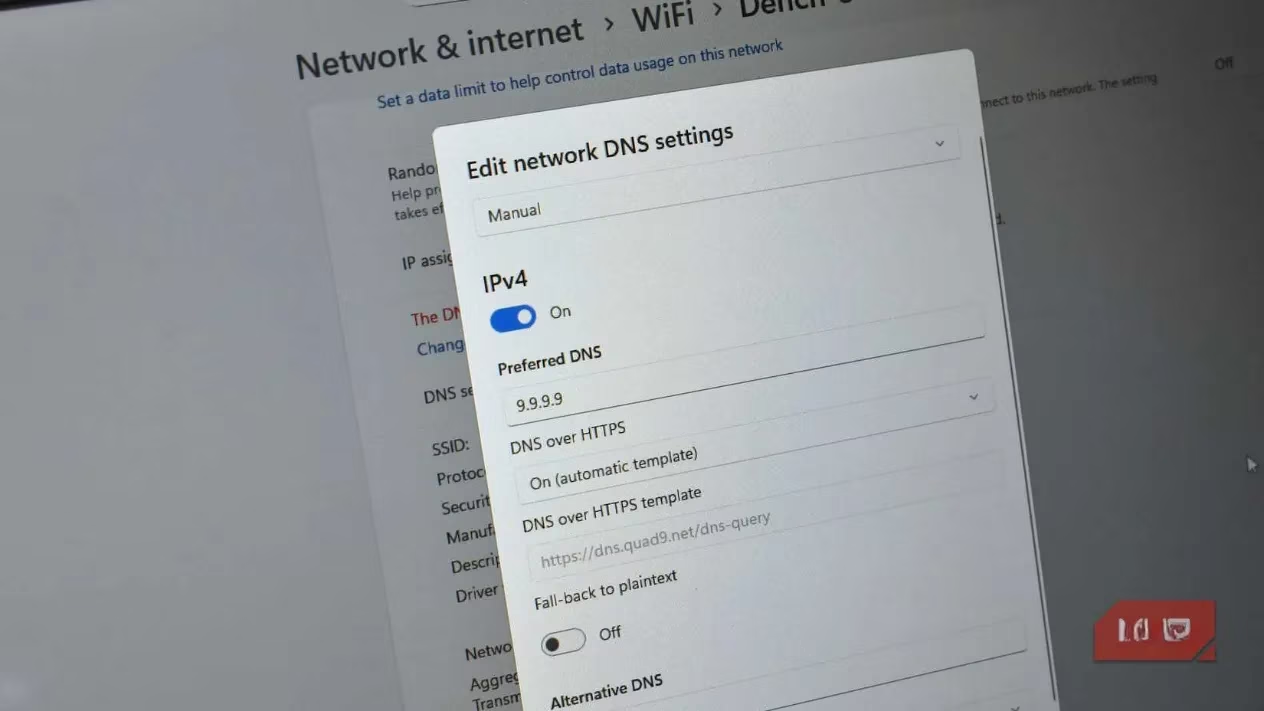
Your Domain Name System (DNS) requests—the queries that translate 'makeuseof.com' into an IP address—are typically sent in plain text, visible to your Internet Service Provider (ISP) or network administrator. Encrypting these requests is a simple yet powerful upgrade.
-
DNS over HTTPS (DoH): Encrypts DNS queries within HTTPS traffic. You can enable this in your browser's settings or, better yet, at the operating system level for all network activity.
-
Private DNS Providers: Services like Cloudflare's 1.1.1.1 or NextDNS offer encrypted DNS resolution, often with additional options to block malware and tracking domains.
3. Master Your Browser's Settings
If switching browsers isn't an option, you can still harden your current one:
-
In Microsoft Edge: Navigate to Settings > Privacy, search, and services to enable 'Strict' tracking prevention, block trackers, and disable optional diagnostic data.
-
In Google Chrome: While limited, you can disable third-party cookies (for now) and use privacy-focused extensions to fill the gaps. Extensions like uBlock Origin (for content blocking), Privacy Badger (to learn and block trackers), and Decentraleyes (to serve local copies of common CDN resources) can significantly enhance protection.
4. Automate the Annoyances
Cookie consent pop-ups are more than a nuisance; they are a fatigue-inducing tool designed to make you click 'Accept All.' Browser extensions like Consent-O-Matic or I don't care about cookies can automatically reject non-essential cookies according to your preferences, reclaiming your time and reducing inadvertent data sharing.
Clearing cookies hasn't become useless—it's still a good hygiene practice, especially on shared devices. However, the core philosophy must shift. Real privacy is proactive, not reactive. It's about minimizing the data you expose in the first place rather than trying to clean up traces afterward. By shifting focus from the crumbs left behind (cookies) to controlling the device's very emissions (fingerprinting, DNS, scripts), you make yourself a harder, less valuable target. The goal isn't invisibility—an impossible feat online—but rather a significant reduction in the unique, linkable signals that define you to the tracking machines. In 2026, privacy is less about hiding and more about owning what you choose to reveal.