
In the sprawling digital landscape of 2026, where shadows of deception lurk behind every click, the journey of a web surfer can feel like a solitary trek through an uncharted wilderness. The air is thick with the whispers of scams, each one a meticulously crafted trap waiting for a moment of inattention. Yet, amidst this perceived chaos, a traveler is rarely as alone as they feel. Unbeknownst to many, their vessel—the ubiquitous Google Chrome browser—is already equipped with a sophisticated array of silent sentinels, standing guard like ancient, watchful trees in a dense forest, their roots intertwined with a vast, intelligent network dedicated to safety. The common misconception that security requires a cumbersome arsenal of third-party tools often obscures the powerful, native protections that have been integrated seamlessly into the very fabric of the browser, evolving quietly with each update to counter the ever-shifting threats of the modern web.
The Ever-Vigilant Watchtower: Google Safe Browsing
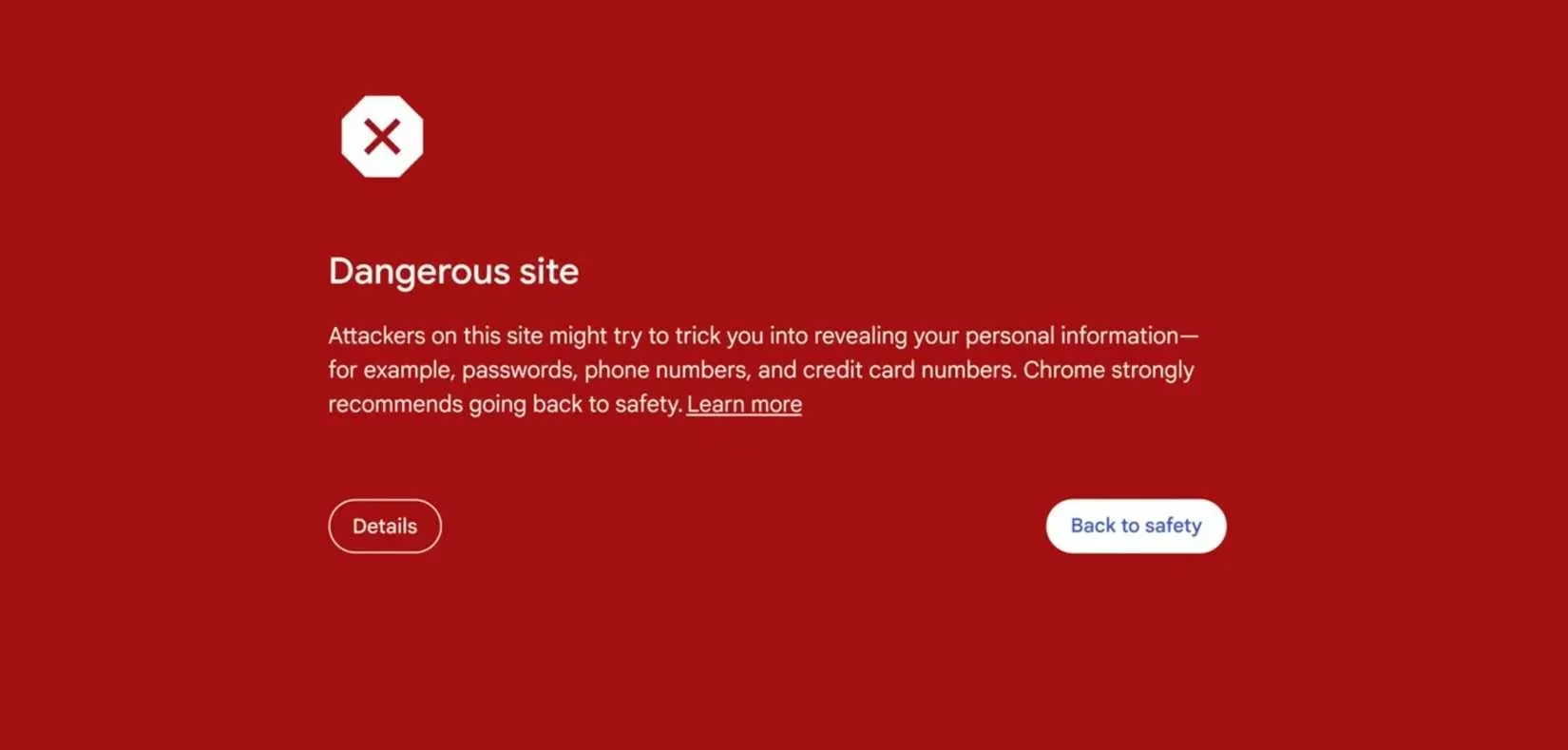
At the core of Chrome's defensive architecture lies Google Safe Browsing, a dynamic and constantly updated database that functions as the internet's communal immune system. Every navigation attempt—a clicked link, a typed address—triggers a silent, instantaneous consultation with this global watchtower. If a destination is flagged for harboring malware, phishing kits, or deceptive content, the journey is halted abruptly by a stark, full-screen warning. Messages like "Deceptive site ahead" serve as unmissable digital barricades, a clear command to retreat. This system is a bulwark against the most prevalent digital deceptions:
-
Phishing Pages: Imitations of legitimate login portals for banks, email services, and social networks.
-
Malware Havens: Sites designed to automatically download harmful software.
-
Social Engineering Traps: Fake stores, giveaway scams, and fraudulent tech support pages.
-
Compromised Legitimates: Previously safe websites that have been hijacked by attackers.
Verifying this guardian's presence is simple: navigate to Settings > Privacy and security > Security > Safe Browsing. It is enabled by default, a testament to its foundational role. Furthermore, since its announcement in 2025, AI scam detection has been woven into this fabric, analyzing page layouts, language patterns, and behavioral cues in real-time to identify sophisticated threats that might evade traditional lists, acting like a psychic hound sniffing out intent where others see only code.
The Enhanced Sentinel: A Proactive Shield
For those seeking an even greater degree of protection, Chrome offers a fortified tier: Enhanced Safe Browsing. This is not merely an upgrade but a transformation, shifting the defense from reactive to proactive. Imagine Safe Browsing as a vigilant lighthouse keeper watching for known shipwrecks; Enhanced Safe Browsing is the captain who also scans the horizon for uncharted reefs and sudden storms. When activated, it enables real-time analysis of websites, downloads, and even browser extensions, assessing their risk profile as you interact. It also integrates with your Google Account to provide personalized alerts, such as notifications if your saved passwords appear in a known data breach.
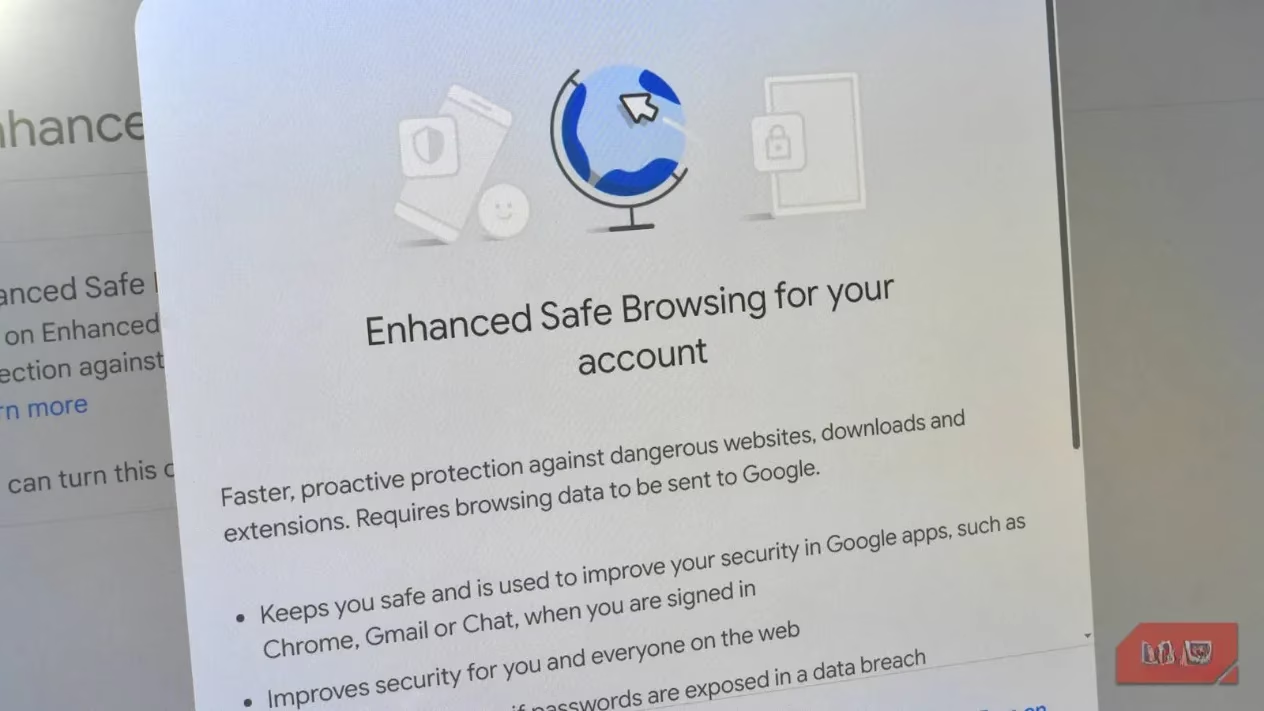
Activating this sentinel is a conscious choice that links security to your identity:
-
Visit
myaccount.google.com. -
Select Security from the top menu.
-
Locate and toggle on the switch for Enhanced Safe Browsing for your account.
While this does share additional data with Google to fuel its protective algorithms, the trade-off is a significantly heightened, personalized security posture with no functional downside for the user.
The Encrypted Pathway: Enforcing HTTPS and Secure DNS
The foundation of secure communication on the web is the HTTPS protocol, which encrypts data between your browser and a website. In 2026, its absence is a glaring red flag. Chrome has inverted its old approach; instead of celebrating HTTPS, it now explicitly warns you when a connection is insecure. To go a step further, a powerful yet often-overlooked setting can force this encryption universally.
Navigate to Settings > Privacy and security > Security and find the option Always use secure connections. Enabling this is like instructing your browser to only travel on guarded, well-lit roads, automatically upgrading any insecure pathway it encounters. Pair this with Secure DNS for comprehensive coverage.
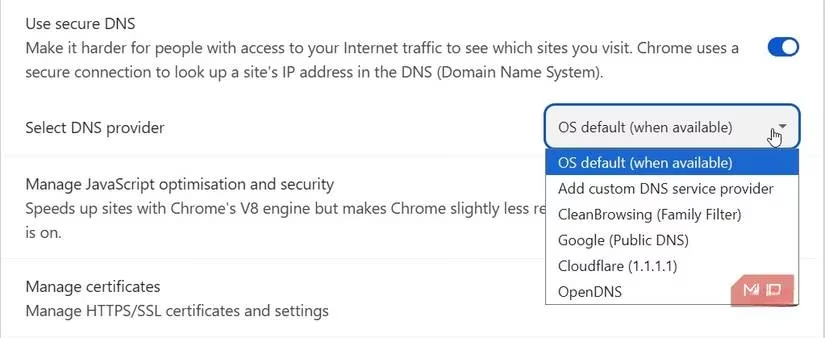
The Domain Name System (DNS) is the internet's phonebook, translating human-readable addresses (like makeuseof.com) into machine-readable IP addresses. Traditionally, these "lookup" requests are sent in plaintext, visible to anyone monitoring the network—a vulnerability as glaring as shouting your destination across a crowded square. DNS over HTTPS (DoH) encrypts these requests, shrouding your browsing destinations in a layer of privacy. To enable it:
-
In
Settings > Privacy and security > Security, find Use secure DNS. -
Toggle the switch on.
-
Choose a provider. While you can use your system's default, selecting a reputable service like Cloudflare (1.1.1.1) is recommended for its strong commitment to privacy and speed.
The Balanced Reality: Security vs. Privacy in 2026
It is an acknowledged reality that Chrome's relationship with user data collection for advertising purposes creates significant privacy concerns—a tension as old as the commercial web itself. However, in the specific domain of security—protecting users from active threats and exploitation—Chrome consistently ranks among the world's most robust browsers. Its vast user base makes it the most frequent target for attackers, which in turn fuels an incredibly rapid and well-resourced response to vulnerabilities. Like a great city wall that is constantly tested and repaired, its defenses are honed by perpetual scrutiny.
Yet, no fortress is impregnable. The landscape of threats evolves, with scammers now employing generative AI to craft flawlessly written emails and deepfake videos, making deception more seductive than ever. Chrome's built-in tools provide a formidable, automated safety net—a digital immune system that operates on instinct—but they do not replace human judgment. The final layer of defense remains the user's own vigilance: the pause before clicking an unsolicited link, the careful inspection of a sender's email address, and the conscious decision to question too-good-to-be-true offers. In the end, the most secure browser is one that pairs its own silent, intelligent guardians with the user's awakened and questioning mind, navigating the digital wilderness not with fear, but with informed confidence.