
I sit before my screen, a digital voyager navigating an ocean of light and information. We are all conditioned to fear the obvious monsters—the malware, the viruses, the blatant attacks that try to break down our digital doors. We install guards, we build walls, and we feel a sense of control. But the most insidious threats often arrive not as invaders, but as polite guests, asking for a key. They are the browser permission pop-ups, those seemingly harmless prompts that appear on legitimate-looking websites, whispering requests for access. With a careless, trusting click on "Allow," we can unwittingly hand over the keys to our digital kingdom, granting websites long-term access to our devices, our data, and our private lives. This is a danger we choose, and because we choose it, our browsers trust it implicitly. The time for passive clicking is over; the time for mindful guardianship is now.
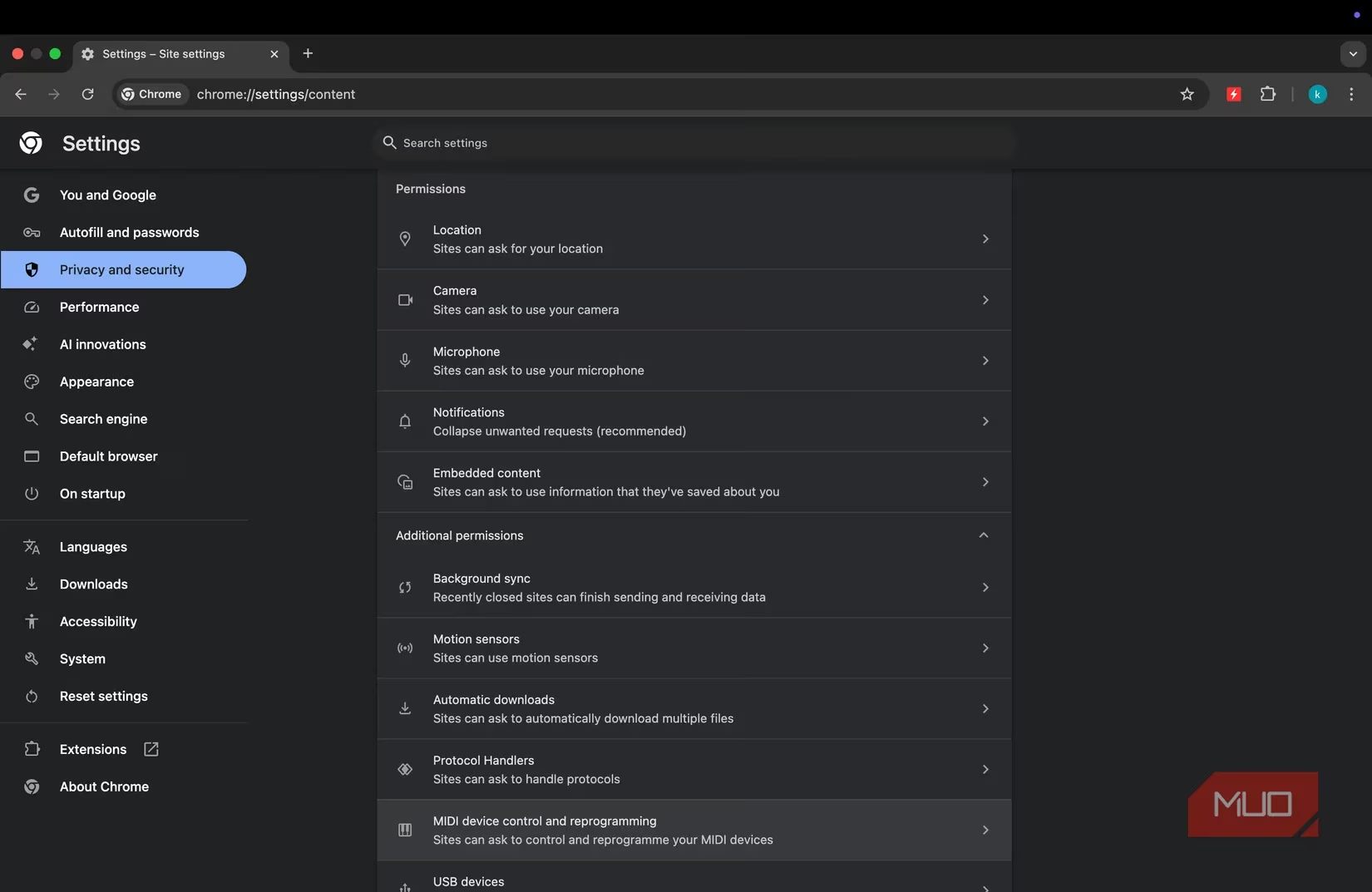
Not all permissions are created equal. Some are minor nuisances, while others are gaping portals to serious breaches of security, privacy, and peace of mind. Let me walk you through the gallery of the most abused requests, the digital sirens whose songs we must learn to resist.
🔔 Notification Permissions: The Wolf in Sheep's Clothing
These pop-ups seem so innocent, offering "useful" desktop alerts. But grant this to a malicious site, and your browser becomes a megaphone for scams. You'll be bombarded with:
-
Fake virus alerts screaming for your attention.
-
"Clean-up required" warnings designed to panic.
-
Endless clickbait and fraudulent giveaways.
-
Redirects to cleverly disguised phishing pages.
The danger lies in their veneer of trust; because they come from the browser itself, they feel official, making it frighteningly easy to fall for the deception.
🌊 Pop-ups, Redirects, and Automatic Downloads: The Digital Tsunami
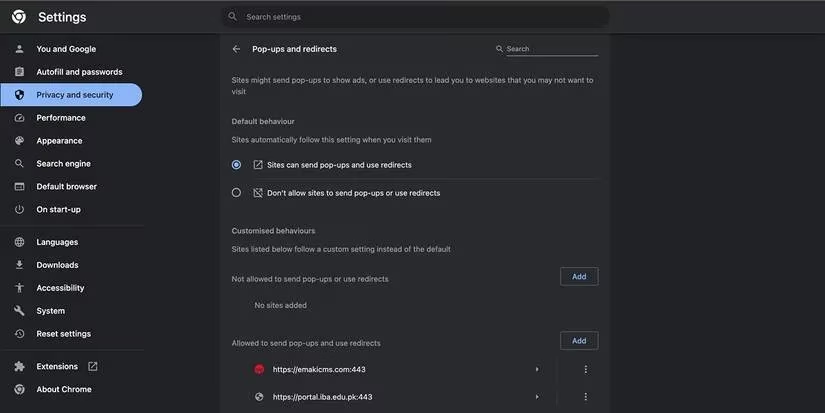
"Allow this site to open new windows?" "Allow automatic downloads?" It sounds so procedural. Yet, a single "yes" can unleash a torrent of chaos:
-
Forced, jarring redirects to inappropriate or malicious sites.
-
Your download folder cluttered with unwanted, potentially dangerous files.
-
Silent delivery of viruses, masked as legitimate software.
Once allowed, even the most robust privacy browsers can struggle to hold back this flood.
📋 Clipboard Access: The Silent Spy
This might sound the most benign—what harm could come from accessing the clipboard? The truth is chilling. Your clipboard is a transient vault for your most sensitive moments:
-
Passwords copied from your manager.
-
Private financial details.
-
Confidential links and notes.
A malicious site with this permission can read everything you copy, modify the links you paste, and operate as a ghost in your machine, completely unbeknownst to you.
📍 Location Access: The Persistent Shadow
While essential for maps or weather, many sites request it without genuine need. Grant it to the wrong entity, and you grant a stalker:
-
They can pinpoint your home, your workplace, your child's school.
-
They can map your daily patterns and routines.
-
This tracking can continue silently in the background, long after you've left the site, painting a detailed portrait of your physical life.
🎤📹 Camera and Microphone Access: The Unblinking Eye
This is perhaps the most visceral violation. A granted permission here is an invitation to be watched and heard. A site can:
-
Activate your camera and microphone in the background.
-
Record private conversations, family moments, or confidential work meetings.
-
While most browsers show an indicator, in a moment of distraction, would you notice the tiny light? The risk is one of constant, potential surveillance.
🖥️ Screen or Desktop Capture: The Ultimate Exposure
This permission allows a site or extension to capture your entire screen. Imagine accidentally exposing:
-
An open banking tab.
-
A private message conversation.
-
Confidential work documents.
While legitimate for screen-sharing apps, it is a permission that must be guarded with extreme prejudice.
The profound irony haunts me. We fear the malware that tries to break in, yet we willingly open the door for threats disguised as permissions. The difference is one of persistence and silence. Once granted, these permissions:
-
Persist across browsing sessions, waiting for you every time you return.
-
Sync across your devices, spreading the vulnerability from your laptop to your phone.
-
Trigger no alarms, operating with the full trust you bestowed upon them.
Malicious actors have evolved. They no longer need complex exploits; they only need a convincing prompt and our human tendency to click without reading. Our inattention is their greatest weapon.
Of course, this landscape is not wholly barren of trust. Permissions are the foundation of a functional, interactive web. It is safe and necessary to click "Allow" when:
-
You are on a website you genuinely trust and frequently use.
-
The site clearly explains why it needs the access (e.g., "Allow microphone for voice search").
-
You have actively requested a feature that requires it, like starting a video call.
The key is intentionality, not blanket denial.
You may think auditing these permissions is a complicated, tedious chore. I once did too. But I was wrong. It is one of the simplest, quickest, and most powerful security upgrades you can perform. Let me show you how easily it can be done in major browsers like Chrome or Edge:
-
Open Settings. ️
-
Select Privacy and Security from the left panel.
-
Click on Site Settings.
Here, you will find a clear, organized dashboard of your digital consents:
| Permission | My Recommended Setting | Why |
|---|---|---|
| Notifications | Block | Eliminates spam and scam vectors entirely. |
| Automatic Downloads | Block | Prevents silent, unwanted file deliveries. |
| Location, Camera, Microphone | Ask every time | Retains control and forces mindfulness for each request. |
From this panel, you can:
-
Review and revoke permissions for any specific site.
-
Block permissions globally for categories you never use.
-
Check recent activity to see which sites have been allowed or blocked.
When I performed my own audit, it was a revelation. I blocked notifications and automatic downloads outright. For the more sensitive permissions—camera, microphone, location—I set them to "ask every time." This simple act transformed my browser from a passive tool into an active guardian. It asks for my conscious consent, and in that moment of asking, I regain control.
Malware still prowls the digital wilds, yes. But in 2025, some of the gravest dangers enter through the front door we hold open ourselves. The notification spam, the forced redirects, the silent tracking—they all exist because of a casual, unthinking click. The beautiful, empowering truth is that the solution is in our hands. Be skeptical. Read every prompt as if it holds the key to your sanctuary. Grant access only when it makes undeniable sense. And regularly, perhaps with your morning coffee, revisit your permissions settings. Clean the digital windows. It is a small ritual of care in a connected world, a way to ensure that your browser remains a window to wonder, not a vulnerability.