
Have you ever felt the sting of buyer's remorse after seeing a product you just bought go on sale for half the price a week later? 😩 Welcome to the club! In the vast digital marketplace of Amazon, where flashy 'LIMITED TIME OFFER!' banners and '70% OFF!!!' tags are designed to trigger impulse buys, how can you separate genuine deals from clever marketing tricks? One tool has become the unsung hero for savvy shoppers worldwide: Keepa. This isn't just another app; it's your personal price intelligence agent, tirelessly working to ensure you never overpay again.
🛒 From Impulse Buyer to Savvy Shopper: The Keepa Transformation
Think about your last Amazon purchase. Did you check if that 'discount' was real, or did you just trust the red strikethrough price? 🤔 Before discovering Keepa, our author was just like most of us—prone to falling for those enticing limited-time deals. The turning point came when friends mentioned buying the same item for significantly less just weeks prior. That moment of realization sparked a journey from being a reactive buyer to a proactive, informed shopper. Since 2019, Keepa has evolved from a simple tool into an indispensable shopping sidekick, helping to snag everything from the latest smartphones to exotic groceries at their true lowest prices.
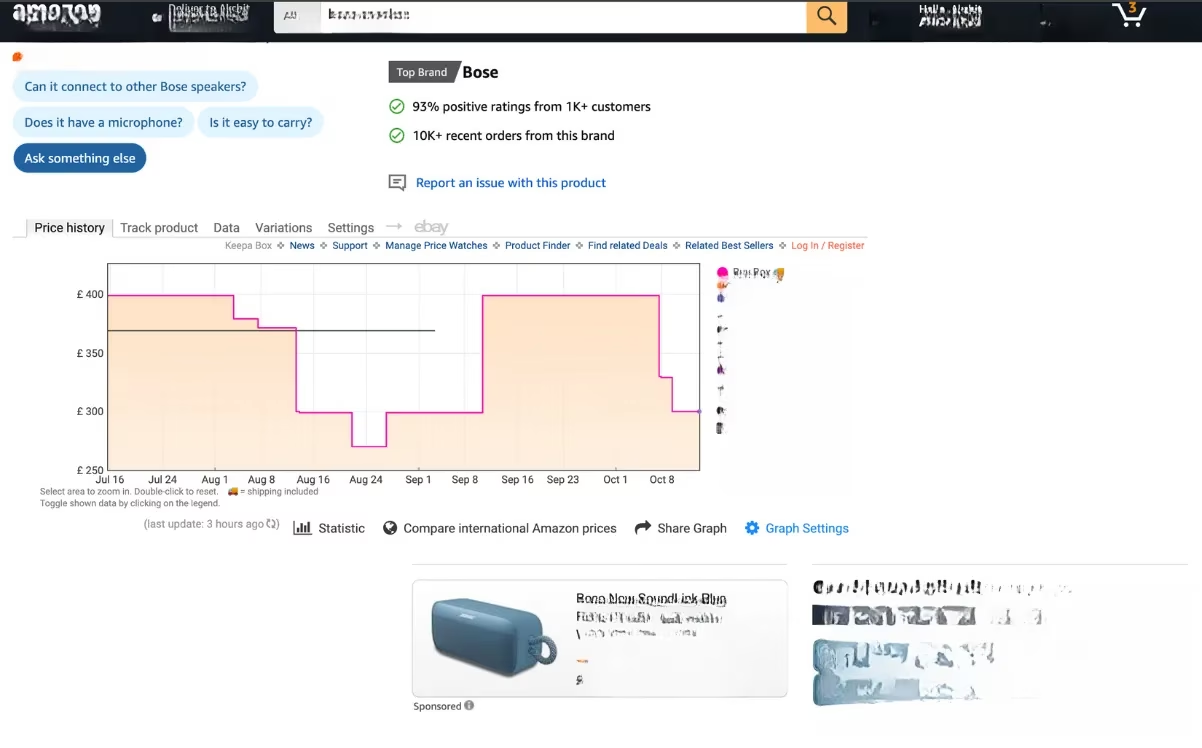
So, what makes Keepa so powerful? It's all about data transparency. While Amazon shows you the current price, Keepa reveals the entire price history. Imagine eyeing a premium hair straightener marked down to $99. It looks like a steal, right? But with one glance at Keepa's chart, you might see it was selling for just $59 two weeks ago. That 'sale' suddenly doesn't look so special. This historical context is the superpower that prevents overpaying, turning every shopper into a patient, strategic buyer.
🔧 Your Keepa Toolkit: Apps, Extensions, and How to Get Started
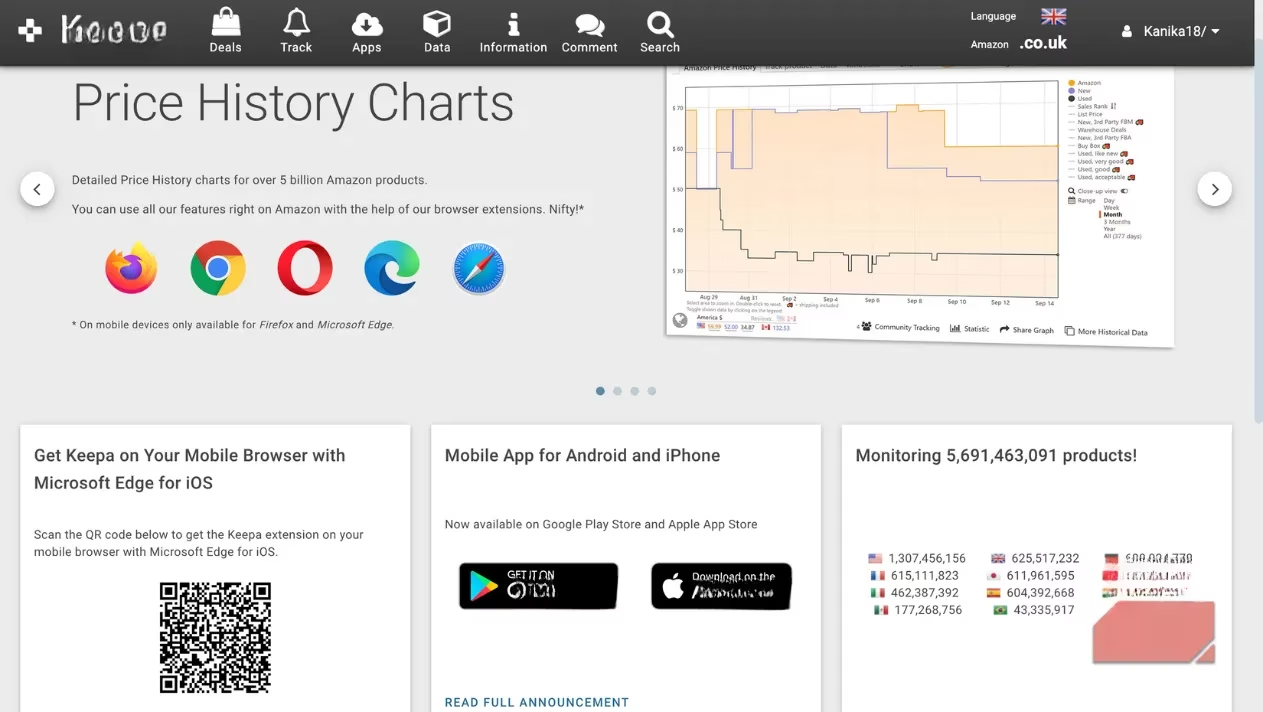
Ready to join the smart shopping revolution? Getting started with Keepa is easier than you think. The beauty of this tool is its versatility—it meets you wherever you shop.
📱 For Mobile Warriors:
-
Dedicated Apps: Available for free on both iOS and Android.
-
Setup: Simply download, choose your language and preferred Amazon locale (like .com, .co.uk, or .de), and log in.
-
Integration: Tap the Amazon tab, sign in with your Amazon account, and voilà! You're ready to explore products with price super-vision.
💻 For Desktop Commanders:
-
Browser Extensions: The real game-changer. Available for:
-
Google Chrome (also works on Opera!)
-
Mozilla Firefox
-
Safari
-
Microsoft Edge
-
-
Installation: You can add it directly from the Keepa website or your browser's respective add-on store (Chrome Web Store, Firefox Add-ons, etc.).
Once installed, the magic happens automatically. Visit any Amazon product page, and right below the product info, Keepa's price history graph appears like a trusted advisor, whispering the product's financial secrets.
🕵️♂️ Decoding the Deal: A Step-by-Step Guide to Using Keepa
Let's walk through exactly how to use Keepa to verify if you're getting a real bargain. Is that 4K monitor truly at its lowest price, or is it a cleverly timed 'sale'? Follow these steps:
-
Open Amazon: Use your browser (with the Keepa extension), the Keepa website, or the smartphone app.
-
Sign In: Log into your Amazon account for a seamless experience.
-
Find Your Product: Search for that item you've been eyeing—be it a new gaming headset, a kitchen gadget, or a book.
-
Scroll & Discover: On the product page, scroll down past the images and description. You'll find the Keepa block waiting.
-
Click 'Price History': This reveals the all-important graph showing the item's price journey over time.
-
Analyze Like a Pro:
-
Look for Patterns: Is the current price a spike or a dip in the long-term trend?
-
Use the Filters: On the right, filter by seller type—Amazon, third-party, or used—to get the most accurate comparison.
-
Adjust the Timeline: View trends over the past day, week, three months, or the product's entire lifetime on Amazon.
-
This process transforms shopping from a guessing game into a data-driven decision. No more wondering, "Is this a good time to buy?" The chart tells you everything.
🚨 Beyond the Graph: Mastering Keepa's Price Alert Superpower
Checking history is great, but what about planning for the future? What if you know you want those Bose speakers, but only when they drop back to $299? Manually checking every day is a chore. This is where Keepa's tracker and alert system truly shines, acting as your 24/7 price watchman.
Here’s how to set up your first tracker and never miss a deal again:
-
Create a Keepa Account: This is your mission control for all tracked items.
-
Find Your Product: Navigate to its Amazon page.
-
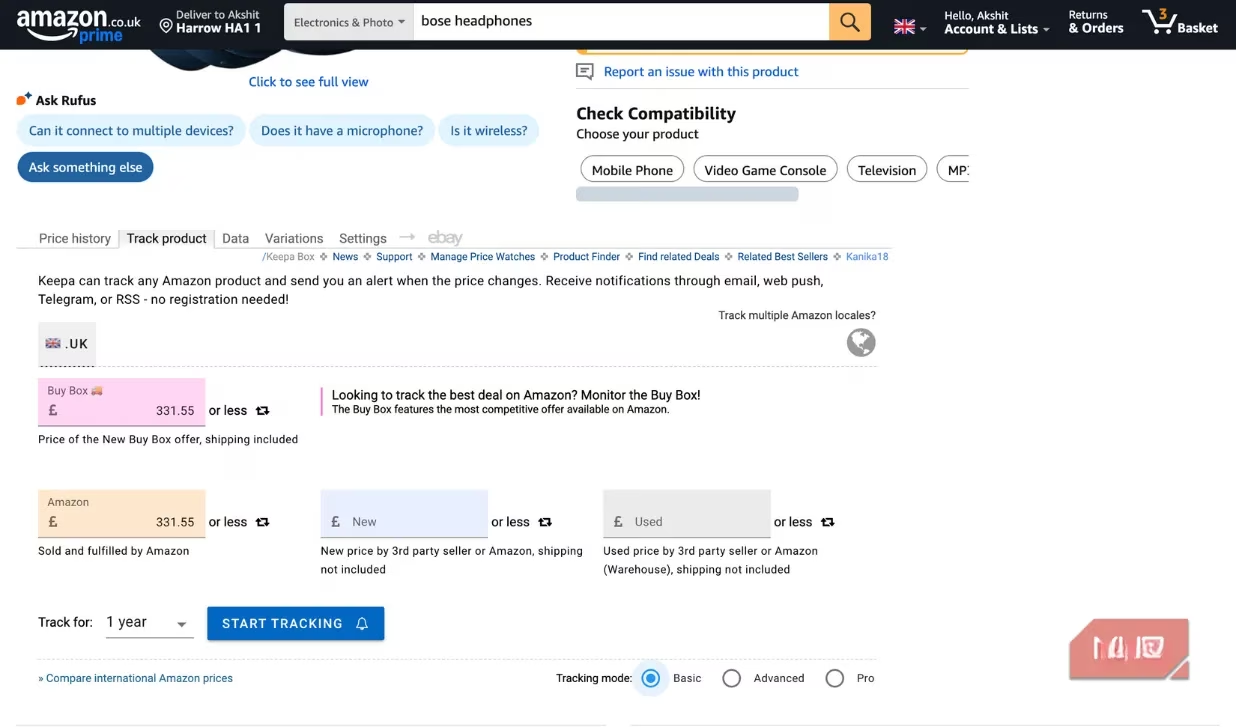
Scroll to the Keepa Block: Click on the 'Track Product' tab.
-
Set Your Targets:
-
Orange Box (Amazon): Enter your desired price for items sold and shipped by Amazon.
-
Purple Box (Third-Party): Optionally, set a target for other sellers.
-
Advanced Options: For power users, you can set alerts for Lightning Deals or Warehouse Deals too.
-
-
Click 'Start Tracking': And just like that, you're done. Keepa takes over.
You can manage all your active trackers from Keepa's 'Tracking Overview' page. Imagine the peace of mind knowing that for your holiday wishlist, birthday gifts, or next tech upgrade, Keepa is on duty, ready to ping you the moment the price is right. It turns waiting from frustrating to strategic.
🏆 Why Keepa is the Non-Negotiable Tool for Every Amazon Shopper in 2026
In an era where dynamic pricing and algorithmic sales are the norm, shopping without data is like navigating a maze blindfolded. Keepa removes the blindfold. It has evolved from a niche tool into an essential part of the modern consumer's arsenal. The author puts it best: they can't remember the last time they shopped on Amazon without Keepa. It's not just about saving money on a single purchase; it's about cultivating a mindset of informed consumption.
The Bottom Line? If you shop on Amazon with any regularity, asking yourself whether you need Keepa is like asking if you need a map on a road trip. You might manage without it, but why would you want to? It's free, easy to use, and provides a crystal-clear view of a product's value over time. In 2026, with shopping becoming ever more digital and complex, tools like Keepa don't just save you money—they give you back your time and confidence. So, the next time you're about to click 'Add to Cart,' ask yourself one final question: Have I checked the Keepa chart? Your wallet will thank you. 💸✅